Fit it into your screens
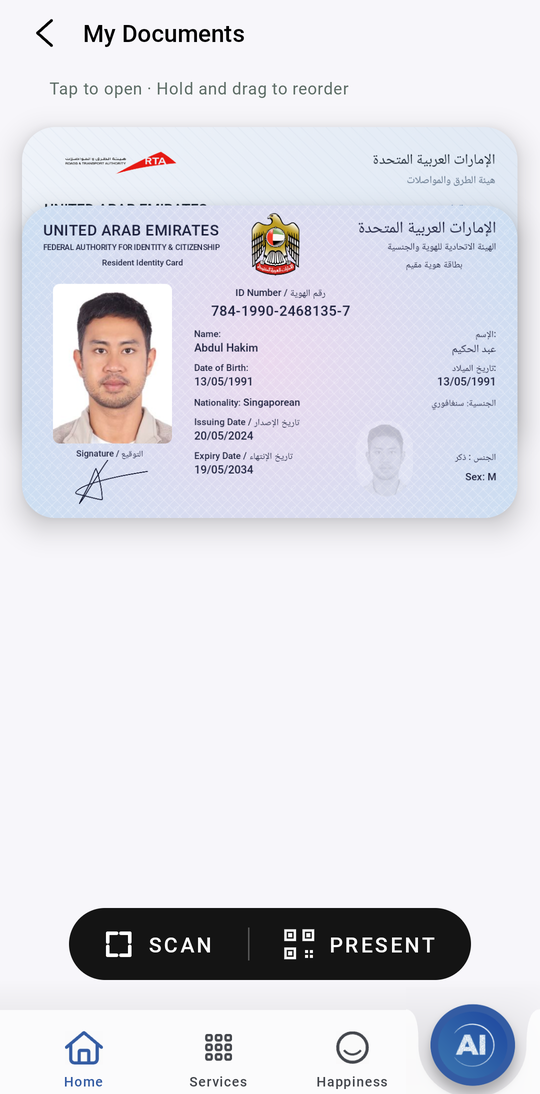
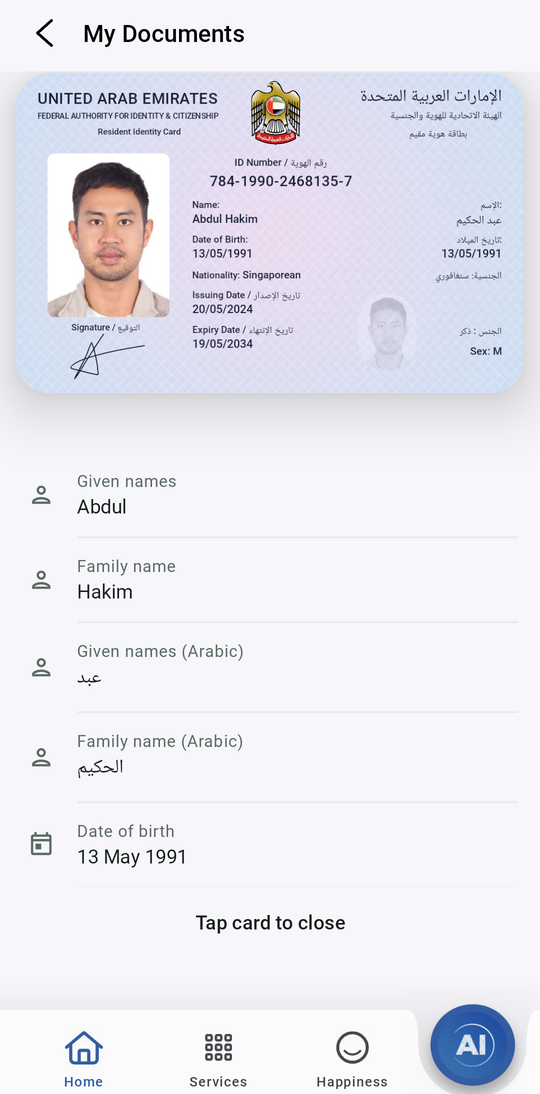
The wallet is one piece between your bars: your title bar above, your tab bar below, the SDK’s cards in between. It draws no heading, takes your page colour, and leaves the pill and Back to you. This is CityNow’s Documents screen; the sample is the same screen with generic names.
package samples
import android.os.Bundleimport androidx.activity.compose.BackHandlerimport androidx.activity.compose.setContentimport androidx.compose.foundation.backgroundimport androidx.compose.foundation.layout.Boximport androidx.compose.foundation.layout.Columnimport androidx.compose.foundation.layout.Rowimport androidx.compose.foundation.layout.fillMaxSizeimport androidx.compose.foundation.layout.fillMaxWidthimport androidx.compose.foundation.layout.heightimport androidx.compose.foundation.layout.paddingimport androidx.compose.foundation.layout.safeDrawingPaddingimport androidx.compose.material3.AlertDialogimport androidx.compose.material3.Cardimport androidx.compose.material3.IconButtonimport androidx.compose.material3.MaterialThemeimport androidx.compose.material3.NavigationBarimport androidx.compose.material3.NavigationBarItemimport androidx.compose.material3.Textimport androidx.compose.material3.TextButtonimport androidx.compose.runtime.Composableimport androidx.compose.runtime.getValueimport androidx.compose.runtime.mutableStateOfimport androidx.compose.runtime.rememberimport androidx.compose.runtime.saveable.rememberSaveableimport androidx.compose.runtime.setValueimport androidx.compose.ui.Alignmentimport androidx.compose.ui.Modifierimport androidx.compose.ui.platform.LocalContextimport androidx.compose.ui.unit.dpimport androidx.fragment.app.FragmentActivityimport com.wallet.ScannedCodeimport com.wallet.WalletSdkimport com.wallet.ui.CredentialOfferSheetimport com.wallet.ui.WalletActionPillimport com.wallet.ui.WalletBrandingimport com.wallet.ui.WalletLinkPresentmentimport com.wallet.ui.WalletPresentScreenimport com.wallet.ui.WalletPromptDialogsimport com.wallet.ui.WalletScanScreenimport com.wallet.ui.WalletScreen
/** Your app stays the app: your home screen, your tiles. One tile, "Documents", opens the wallet. */class HostActivity : FragmentActivity() {    override fun onCreate(savedInstanceState: Bundle?) {        super.onCreate(savedInstanceState)        setContent {            var documents by rememberSaveable { mutableStateOf(false) }            WalletBranding.theme {   // the SDK's theme in your colours and typeface (see Branding.kt)                if (documents) DocumentsScreen(App.sdk, onBack = { documents = false })                else HomeScreen(onDocuments = { documents = true })            }        }    }}
@Composableprivate fun HomeScreen(onDocuments: () -> Unit) {    Column(Modifier.fillMaxSize().safeDrawingPadding().padding(24.dp)) {        Text("My Hub", style = MaterialTheme.typography.titleLarge)        // One of your tiles.        Card(onClick = onDocuments, modifier = Modifier.padding(top = 16.dp).fillMaxWidth()) {            Text("Documents", Modifier.padding(20.dp))        }    }}
/** "← My Documents" over the SDK's wallet (cards, details), with your tab bar below it. */@Composablefun DocumentsScreen(sdk: WalletSdk, onBack: () -> Unit) {    var scanning by remember { mutableStateOf(false) }    var presenting by remember { mutableStateOf(false) }    var cardOpen by remember { mutableStateOf(false) }    var offerUri by remember { mutableStateOf<String?>(null) }    var scanProblem by remember { mutableStateOf<String?>(null) }    val context = LocalContext.current    // Back closes the scanner or the Present screen first, then returns to your home.    BackHandler { if (scanning || presenting) { scanning = false; presenting = false } else onBack() }
when { // The SDK's full-screen flows: they bring their own close button. scanning -> WalletScanScreen( onScanned = { code -> scanning = false when (val scanned = ScannedCode.classify(code)) { is ScannedCode.CredentialOffer -> offerUri = scanned.uri // an issuer's offer: the sheet below is ScannedCode.PresentationRequest -> WalletLinkPresentment.start(context, sdk, scanned.uri) // a website's request: the SDK's screen is ScannedCode.Unrecognized -> scanProblem = "This QR code isn't a request for your documents or a new document to add." } }, onClose = { scanning = false }, ) presenting -> WalletPresentScreen(sdk, onClose = { presenting = false }) else -> Box(Modifier.fillMaxSize().background(MaterialTheme.colorScheme.background).safeDrawingPadding()) { Column(Modifier.fillMaxSize()) { // Your title bar. Row(Modifier.fillMaxWidth().height(56.dp), verticalAlignment = Alignment.CenterVertically) { IconButton(onClick = onBack) { Text("‹", style = MaterialTheme.typography.headlineMedium) } Text("My Documents", style = MaterialTheme.typography.titleLarge) } // The wallet, without its own heading: your bar above is the title. WalletScreen(sdk, Modifier.weight(1f), onCardOpen = { cardOpen = it }, title = null) // Your tab bar. NavigationBar { NavigationBarItem(selected = true, onClick = onBack, icon = { Text("⌂") }, label = { Text("Home") }) NavigationBarItem(selected = false, onClick = {}, icon = { Text("☰") }, label = { Text("Services") }) } } // The SDK's Scan | Present pill, just above your tab bar. No shadow, so the two don't stack. if (!cardOpen) { WalletActionPill( onScan = { scanning = true }, onPresent = { presenting = true }, shadow = false, modifier = Modifier.align(Alignment.BottomCenter).padding(bottom = 96.dp), ) } } } offerUri?.let { CredentialOfferSheet(sdk, it, onDone = { offerUri = null }) } // Anything else that was scanned: say so, instead of silently doing nothing. scanProblem?.let { message -> AlertDialog( onDismissRequest = { scanProblem = null }, confirmButton = { TextButton(onClick = { scanProblem = null }) { Text("OK") } }, title = { Text("Not a document request") }, text = { Text(message) }, ) } WalletPromptDialogs() // the consent sheet and the permission prompts, over everything}import SwiftUIimport Wallet
/// Your app stays the app: your home screen, your tiles. One tile, "Documents", opens the wallet.struct HostHome: View { @State private var documents = false
var body: some View { Group { if documents { DocumentsScreen(onBack: { documents = false }) } else { VStack(alignment: .leading, spacing: 16) { Text("My Hub").font(.title2.bold()) Button("Documents") { documents = true } // one of your tiles Spacer() } .padding(24) } } // Credential offers and website requests that open the app go to the wallet. .onOpenURL { url in if WalletViewControllersKt.handleWalletUrl(url: url.absoluteString, sameDevice: true) { documents = true } } }}
/// "‹ My Documents" over the SDK's wallet (cards, Scan | Present, consent), with your tab bar below it.struct DocumentsScreen: View { var onBack: () -> Void
var body: some View { VStack(spacing: 0) { // Your title bar. HStack(spacing: 12) { Button(action: onBack) { Image(systemName: "chevron.left").font(.title3.weight(.semibold)) } Text("My Documents").font(.headline) Spacer() } .padding(.horizontal, 16).frame(height: 44) // The wallet, without its own heading: your bar above is the title. EmbeddedWallet() // Your tab bar. HStack { Spacer(); Button(action: onBack) { Label("Home", systemImage: "house") } Spacer(); Label("Services", systemImage: "square.grid.2x2"); Spacer() } .frame(height: 50) } .background(Color(red: 0.97, green: 0.96, blue: 0.98)) // the same colour as WalletBranding.backgroundColor }}
/// The SDK's wallet screen, hosted in SwiftUI. `title: nil` hides its heading; `pillShadow: false` because the/// Scan | Present pill sits just above your own tab bar.struct EmbeddedWallet: UIViewControllerRepresentable { func makeUIViewController(context: Context) -> UIViewController { WalletViewControllersKt.WalletViewController(sdk: MyWallet.sdk, title: nil, pillShadow: false) } func updateUIViewController(_ controller: UIViewController, context: Context) {}}Your title bar
Section titled “Your title bar”The wallet screen draws a large heading above the cards, Wallet by default. Give it your own, or none when your bar above it is the title:
| Android | iOS | |
|---|---|---|
| Your heading | WalletScreen(sdk, title = "Documents") |
WalletViewController(sdk: sdk, title: "Documents", pillShadow: true) |
| No heading | WalletScreen(sdk, title = null) |
WalletViewController(sdk: sdk, title: nil, pillShadow: false) |
Your page colour
Section titled “Your page colour”Set WalletBranding.backgroundColor (Swift: setBackgroundColor(argb:)) to the colour of your own screens,
and the wallet, your bars and the space between them are one surface. On iOS, give the SwiftUI container
the same colour, as the sample does. The rest of the branding is in
Make it look like your app.
Your tab bar and the pill
Section titled “Your tab bar and the pill”The Scan | Present pill is the SDK’s, but you place it. On Android you draw it,
WalletActionPill(onScan, onPresent), over the wallet and just above your tab bar; on iOS the controller
draws it at the bottom of its view. Pass shadow = false (iOS: pillShadow: false) so its shadow and
your tab bar’s don’t stack. onCardOpen tells you when a card is open, so you can hide the pill, as the
sample does.
The wallet shows its cards as soon as your screen opens, from a copy it keeps of the last card list, while the
wallet loads behind them. The pill appears together with the cards, never before them, and hides while a
consent sheet is up: draw it on the same screen as WalletScreen.
Back means your home screen. The scanner and the Present screen are full-screen flows with their own close
button; on Android the sample’s BackHandler closes them first, then returns to your home. Your bar’s
arrow and your Home tab do the same. The SDK’s consent sheet and permission prompts draw over everything
through WalletPromptDialogs(); on iOS the controller hosts them itself. The consent sheet closes only with
its Cancel, its ✕ or Back, never with a swipe (The consent sheet).
Scanning
Section titled “Scanning”The pill’s Scan button opens the SDK’s scanner. A code it reads is one of three things; on Android you
decide what happens with each, with ScannedCode.classify:
| The code is | What to do |
|---|---|
| a website’s request (a QR on a laptop screen) | WalletLinkPresentment.start(context, sdk, uri): the SDK’s screen fetches the request, shows the consent sheet, runs the face check and answers |
| an issuer’s credential offer | CredentialOfferSheet(sdk, uri): the holder previews and accepts the new card |
| anything else | say so. CityNow shows “Not a document request” with one line, as the sample does |
On iOS the controller scans itself and does the first two; a code that is neither is ignored.
Scan or tap
Section titled “Scan or tap”A website’s request reaches a phone in two ways. Your app only needs the scan; the tap opens the wallet registered with the hosted service for its link domain (Wallet links).
| Another screen: a scan | Same phone: a tap | |
|---|---|---|
| What the holder does | opens your tile, taps Scan, scans the QR on the laptop | taps the QR in the browser on this phone |
| Who opens the wallet | your app’s scanner | the service, through the link registered for the domain |
| After sharing | the site’s tab turns green; nothing to return to | the holder is sent back to the site |
CityNow scans only. A tap in a browser keeps opening the wallet registered for the domain, never CityNow. If your app should answer browser links itself, add the intent filters and the Associated Domain (Present) and register it with us: one wallet per link domain.
Next: Make it look like your app.