Verifiable credentials
People now carry their official documents on their phones as verifiable credentials: a driving licence, an Emirates ID, a competition licence. Each one is signed by the authority that issued it, bound to the holder’s phone, and shared only when the holder agrees, one request at a time. The Wallet SDK lets your product use them: check them on your website or in a verifier app, or hold them in your own wallet app.
You will also see them called digital IDs, digital credentials or, for a driving licence, mDLs (mobile driving licences).
Three parties take part, and the standards define how each step works:
| Step | Who | Standard |
|---|---|---|
| Issue | the authority sends the credential to the holder’s wallet | OpenID for Verifiable Credential Issuance (OpenID4VCI) |
| Hold | the wallet keeps it on the phone, bound to a key in the phone’s secure hardware | the credential format: ISO/IEC 18013-5 mdoc |
| Present, in person | the holder shows a QR code; the phones connect over Bluetooth | ISO/IEC 18013-5 |
| Present, online | a website asks through the browser or a link, and the wallet answers | OpenID for Verifiable Presentations (OpenID4VP), the W3C Digital Credentials API, ISO/IEC 18013-7 |
Every credential this SDK handles uses the ISO mdoc format, the one behind national mobile driving licences and the EU Digital Identity Wallet. The term “verifiable credential” comes from the W3C, whose data model is a different format for the same idea. Details and tested wallets and verifiers are in Standards and interoperability.
Why “verifiable”
Section titled “Why “verifiable””A photo of a card proves nothing: it can be edited, copied and reused. A verifiable credential is different in four ways.
| Property | What it means for you |
|---|---|
| Signed by the issuer | you can check, offline, that the authority really issued these exact values and that nothing was changed |
| Bound to the phone | a presentation is signed with a key that never leaves the holder’s device, so a copy or a replay fails |
| Selective disclosure | the holder shares only the fields you ask for: a bar learns “over 21” without learning a name or a birth date |
| Carries its validity | the credential says when it expires, and the issuer can publish a revocation status you can check |
The credentials the SDK supports today
Section titled “The credentials the SDK supports today”| Credential | What it is | Standard |
|---|---|---|
| Mobile driving licence (mDL) | the digital driving licence | ISO/IEC 18013-5, the international mDL standard |
| Emirates ID | the UAE resident identity card, as a digital Photo ID | ISO/IEC 23220 Photo ID (a demo profile with fictional data) |
| Competition licence (mCL) | a motorsport competitor licence | a project-defined profile on the same container |
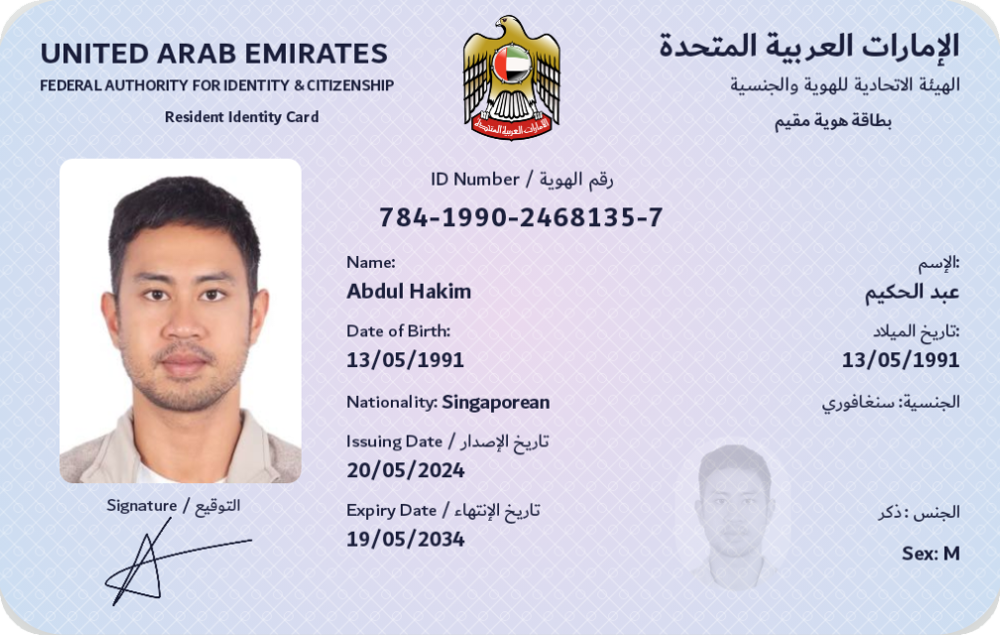
Other document types can be added: each is a list of fields with labels and a card design. See Add your own document type.
One container, many documents
Section titled “One container, many documents”All three use the same container, ISO/IEC 18013-5 mdoc, and the same ways of presenting it: QR code plus Bluetooth in person, OpenID for Verifiable Presentations and the browser’s Digital Credentials API online. A credential held in the SDK’s wallet can be checked by any standards-based verifier, and the SDK’s verifiers check credentials from other standards-based wallets. There is no lock-in format.
The technical details, field by field, are on the pages below and in mdoc architecture.
Wallet, verifier, issuer
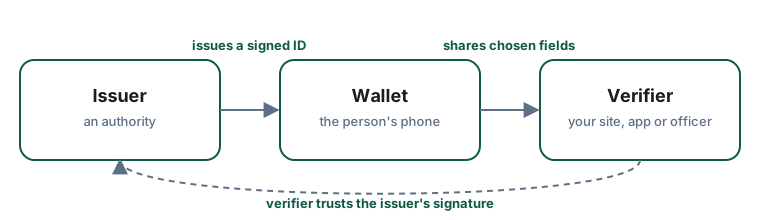
Section titled “Wallet, verifier, issuer”Every exchange involves three parties.
Issuer
Section titled “Issuer”The authority that puts the credential in the wallet: a transport authority for a driving licence, the federal authority for an Emirates ID, a sports body for a competition licence. The issuer signs the credential and publishes the certificate verifiers need to check that signature.
The SDK does not issue credentials. The wallet receives them from an issuer over OpenID for Verifiable Credential Issuance. The demo wallet issues itself demo credentials so you can try everything without an issuer.
Wallet (the holder)
Section titled “Wallet (the holder)”The app on the person’s phone that holds credentials and presents them. It shows the person who is asking and for which fields, and releases nothing without their approval.
You build one with the wallet SDK, or use the demo wallet app. The wallet in the Hello Mobile demo appears as ICP Wallet.
Verifier (the relying party)
Section titled “Verifier (the relying party)”Whoever needs to check the credential: your website, your in-person app, an officer. The verifier asks for specific fields, receives them, and checks:
- the issuer’s signature and that the issuer is one it trusts;
- that the credential is bound to the phone that presented it;
- that the credential is valid today and not revoked.
You verify in person or on your website.
One device, one role at a time
Section titled “One device, one role at a time”An app can contain both a wallet and a verifier, but a phone plays one role per session: it either shows a QR code or scans one.
Each credential
Section titled “Each credential”- Emirates ID
- Mobile driving licence
- Mobile competition licence
- mdoc architecture: the container and the security mechanisms they share