This is the full developer documentation for Wallet SDK
# Wallet SDK
> Verify verifiable credentials on your website or in person, or hold them in your own app.
People carry **verifiable credentials** on their phones: a driving licence, an Emirates ID, a competition licence. Each one is signed by the authority that issued it, tied to the phone, and shared only when the holder agrees. The Wallet SDK lets your product use them. [What they are](/platform/credentials/).
## Three products, one SDK
[Section titled “Three products, one SDK”](#three-products-one-sdk)
[Build verification into your website](/web/)One HTML element. The customer scans or taps, approves on their phone, and your server gets the verified fields. Live in an afternoon.
[Build a verifier app](/in-person/)A native Android and iOS screen for counters and field staff. Pick a check, scan the phone, read yes or no. Works offline.
[Build a wallet app](/wallet/)Hold verifiable credentials in your own app with ready-made screens, and present them in person or to websites.
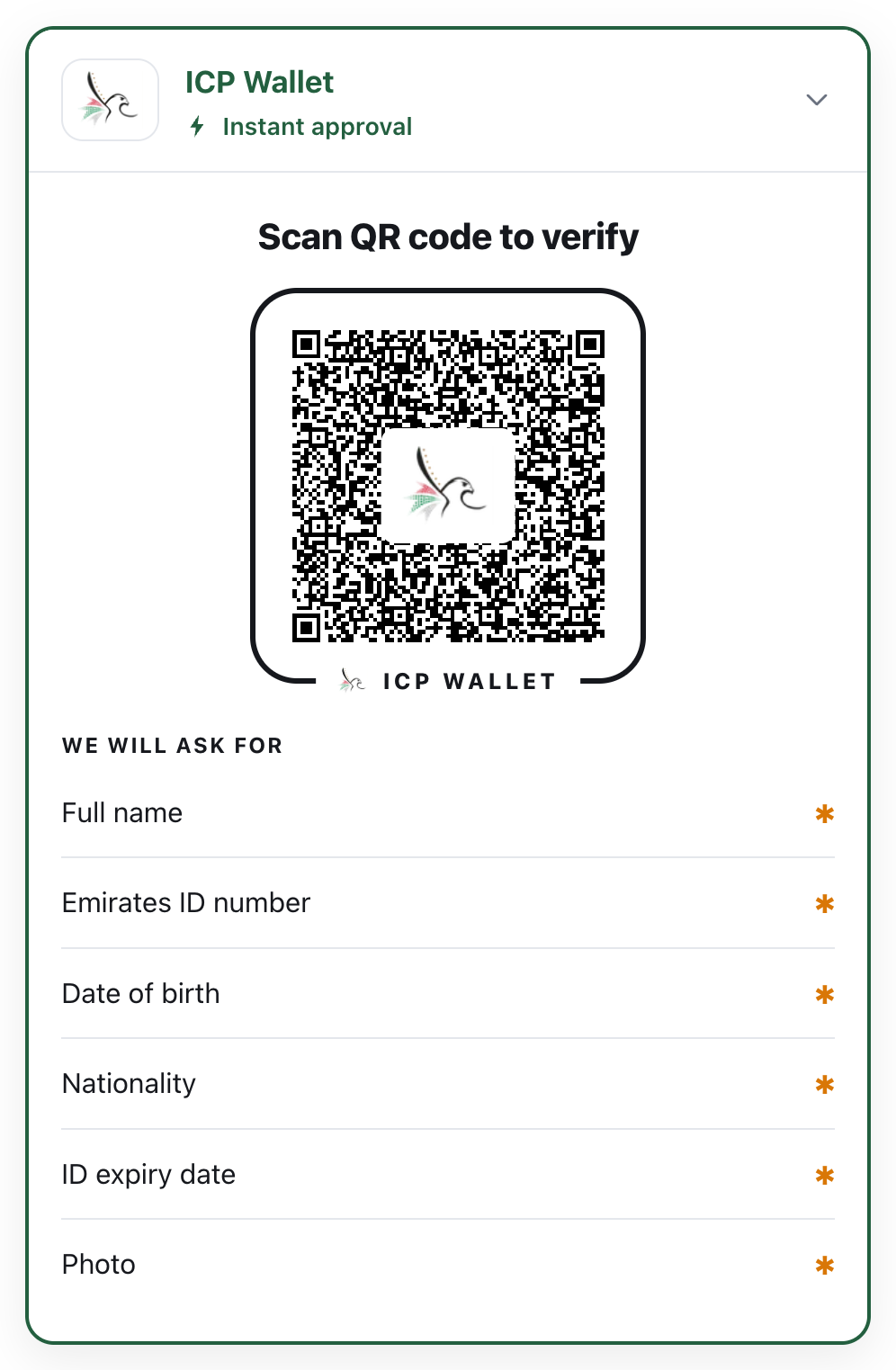
What a customer sees on a website that uses the SDK.
## How a check works
[Section titled “How a check works”](#how-a-check-works)
The same five steps every time, on a website or at a counter.
```
sequenceDiagram
autonumber
actor H as Holder (the customer)
participant W as Wallet (holder's phone)
participant V as Verifier (your site or app)
V->>W: Signed request: which document, which fields
W->>H: Names the verifier, shows the fields
H->>W: Approves
W->>V: Only the approved fields, signed by the phone
V->>V: Checks issuer signature, device binding, validity, revocation
V-->>V: One result: accept, reject or inconclusive
```
Nothing leaves the phone without the holder’s approval, and you receive only the fields you asked for. The details are in [Trust](/platform/trust/) and [Security and privacy](/platform/security/).
## Start here
[Section titled “Start here”](#start-here)
[Try it in 5 minutes](/start/try-it/)Watch a real check happen between a phone and a website.
[The demos](/start/demos/)Four working products built with the SDK, with live links.
[Install & versions](/platform/install/)The zip, the packages, and how to add them to a project.
[Support](/platform/support/)Keys, builds, trust lists and updates.
# Build a verifier app
> A native Android and iOS screen for counters, doors and field staff. Pick a check, scan the holder's phone, read a clear result. Works offline.
The holder shows a QR code in their wallet; your app scans it; the two phones connect over Bluetooth; your app shows a green or red result with the photo for a face check. No internet is needed for the check itself ([Work offline](/in-person/offline/)).
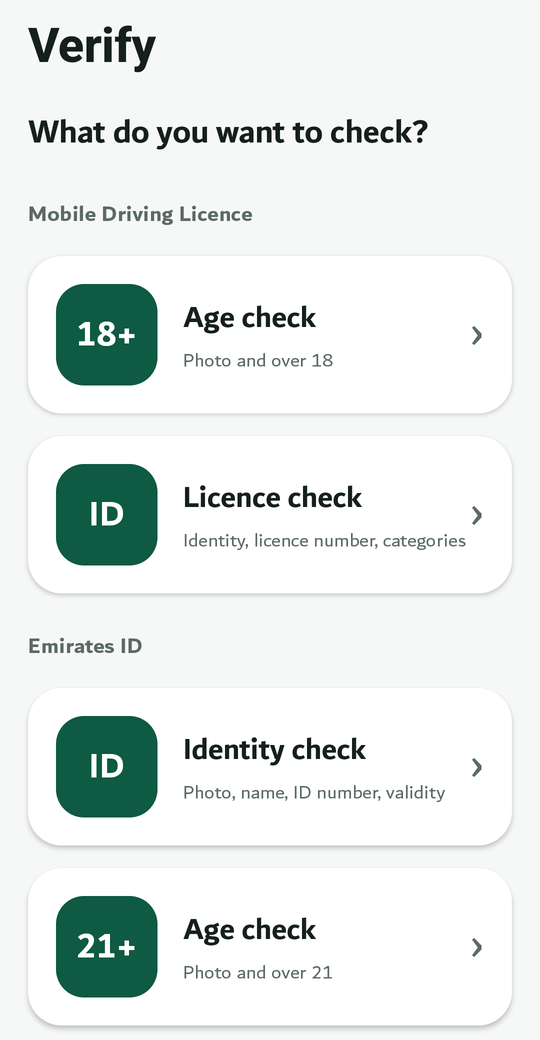
The operator picks a check.
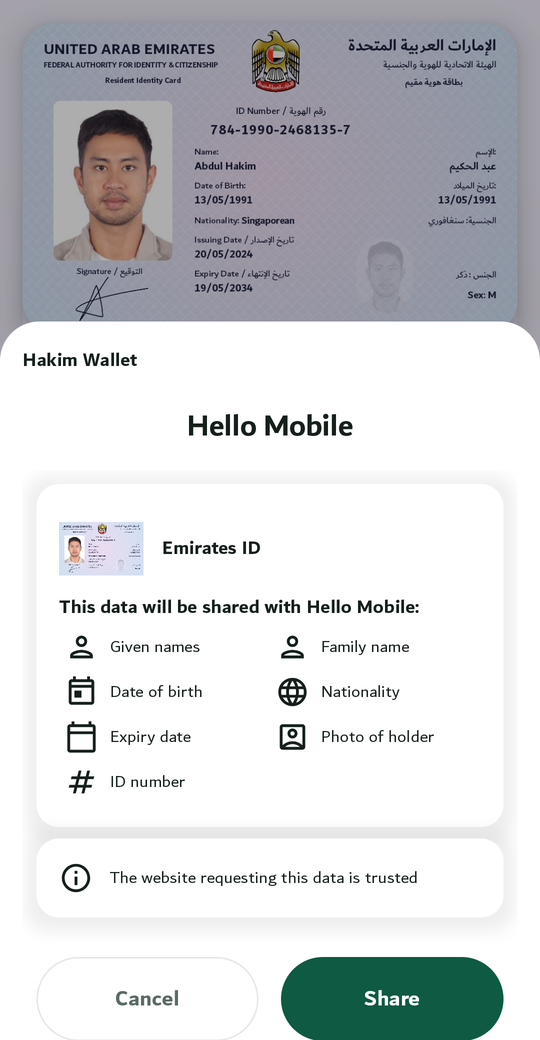
The holder approves on their phone.
## How it works
[Section titled “How it works”](#how-it-works)
```
sequenceDiagram
autonumber
actor P as Operator
participant O as Your app (verifier)
participant W as Wallet (holder's phone)
actor H as Holder
P->>O: Picks a check (a preset)
H->>W: Taps Present: QR code
O->>W: Scans the QR, connects over Bluetooth
O->>W: Signed request: document + fields
W->>H: Names the verifier, lists the fields
H->>W: Approves
W->>O: Approved fields, signed by the phone
O->>O: Issuer signature, device binding, validity, revocation
O-->>O: Accept / reject / inconclusive, with the portrait
```
## What you get
[Section titled “What you get”](#what-you-get)
* **One verify screen** (`WalletVerifyScreen` on Android, `WalletVerifyViewController` on iOS): the list of checks, camera and Bluetooth permission set-up, the scanner, the connection, and the result view (banner, large portrait, fields, the checks that ran, how current the revocation answer is).
* **Presets** for the driving licence (age 18+, licence check), the Emirates ID (age 18+, identity) and the competition licence (valid medical, licence check). Define your own in a few lines.
* **The headless API** (`sdk.verifier`) if you want your own screens.
## Worked example
[Section titled “Worked example”](#worked-example)
The **Verify app** is the demo: Android and iOS, six presets, a signed issuer list for trust and a reader certificate so wallets name it. The [Quickstart](/in-person/quickstart/) builds the same app; its Kotlin is compiled against the SDK in the repository, and its Swift in a real Xcode project.
**Next:** [Quickstart](/in-person/quickstart/).
# Define your checks
> A check is a preset - a title the operator sees, the document, the fields, and how the answer is shown.
* Android (Kotlin)
Checks.kt
```kotlin
package samples
import com.wallet.model.DocTypes
import com.wallet.model.PresentationRequest
import com.wallet.model.PresetAnswer
import com.wallet.model.RequestPreset
/** The checks an operator can pick. A preset is a title, the document, the fields, and how to show the answer. */
object Checks {
private const val EID = "org.iso.23220.1"
private const val EID_PHOTO_ID = "org.iso.23220.photoid.1"
val AGE_18 = RequestPreset(
id = "eid-age-over-18",
section = "Emirates ID", // group in the picker
title = "Age check",
subtitle = "Photo and over 18",
request = PresentationRequest(
docType = DocTypes.PHOTO_ID,
namespaces = mapOf(EID to setOf("portrait", "age_over_18", "issuing_authority")),
),
answer = PresetAnswer.YesNo("age_over_18", "Over 18"), // one big Yes / No
symbol = "18+",
)
val IDENTITY = RequestPreset(
id = "eid-identity",
section = "Emirates ID",
title = "Identity check",
subtitle = "Photo, name, ID number, validity",
request = PresentationRequest(
docType = DocTypes.PHOTO_ID,
namespaces = mapOf(
EID to setOf("portrait", "given_name", "family_name", "birth_date", "expiry_date", "issuing_authority"),
EID_PHOTO_ID to setOf("person_id"),
),
),
answer = PresetAnswer.Details, // photo, name and every field returned
symbol = "ID",
)
val emiratesId = listOf(AGE_18, IDENTITY)
}
```
* iOS (Swift)
Checks.swift
```swift
import Wallet
/// The checks an operator can pick. A preset is a title, the document, the fields, and how to show the answer.
enum Checks {
private static let eid = "org.iso.23220.1"
private static let eidPhotoId = "org.iso.23220.photoid.1"
static let age18 = RequestPreset(
id: "eid-age-over-18",
section: "Emirates ID", // group in the picker
title: "Age check",
subtitle: "Photo and over 18",
request: PresentationRequest(
docType: DocTypes.shared.PHOTO_ID,
attributes: [],
namespaces: [eid: ["portrait", "age_over_18", "issuing_authority"]]
),
answer: PresetAnswerYesNo(element: "age_over_18", label: "Over 18"), // one big Yes / No
symbol: "18+"
)
static let identity = RequestPreset(
id: "eid-identity",
section: "Emirates ID",
title: "Identity check",
subtitle: "Photo, name, ID number, validity",
request: PresentationRequest(
docType: DocTypes.shared.PHOTO_ID,
attributes: [],
namespaces: [
eid: ["portrait", "given_name", "family_name", "birth_date", "expiry_date", "issuing_authority"],
eidPhotoId: ["person_id"],
]
),
answer: PresetAnswerDetails.shared, // photo, name and every field returned
symbol: "ID"
)
static let emiratesId = [age18, identity]
}
```
Pass presets to the screen in the order you want them; they are grouped by `section` (`RequestPresets.mdl + Checks.emiratesId`, as in the [Quickstart](/in-person/quickstart/)).
## How the answer is shown
[Section titled “How the answer is shown”](#how-the-answer-is-shown)
| `answer` | The result screen shows |
| ----------------------------------------- | ----------------------------------------------------------------- |
| `PresetAnswer.Details` | the photo, the name and every field returned |
| `PresetAnswer.YesNo(element, label)` | one large Yes / No from a boolean field (`age_over_21`) |
| `PresetAnswer.ValidUntil(element, label)` | one large Valid / Expired from a date field (a medical, a permit) |
## Ask for the minimum
[Section titled “Ask for the minimum”](#ask-for-the-minimum)
The wallet shows the list to the holder, and a short list is approved more often.
| You need to know | Ask for |
| ----------------------- | ------------------------------------------------------------------------ |
| Is this person over 21? | `portrait`, `age_over_21` |
| Who is this person? | `portrait`, `given_name`, `family_name`, `birth_date`, and the ID number |
| Is the licence valid? | `portrait`, `document_number`, `expiry_date`, `driving_privileges` |
`issuing_authority` is not personal data and lets the result say who issued the document.
## Ready-made presets
[Section titled “Ready-made presets”](#ready-made-presets)
| Document | Presets |
| ------------------- | ------------------------------------------------------------------------------ |
| Driving licence | `RequestPresets.MDL_AGE_OVER_18`, `RequestPresets.MDL_DRIVER_CHECK` (built in) |
| Emirates ID | age 18+ and identity (the sample above; the demo’s brand pack has the same) |
| Competition licence | valid medical, licence check (in the demo’s brand pack) |
Field names per document are in [Credentials](/platform/credentials/).
**Next:** [Read the result](/in-person/result/).
# Go live
> What to have in place before staff verify real customers.
## Before launch
[Section titled “Before launch”](#before-launch)
* [ ] **Production issuer trust.** Load the real authority’s issuer certificate or signed list (`TrustConfig.issuerVical` / `issuerRootsPem`), not the demo one. See [Trust](/platform/trust/).
* [ ] **Your reader certificate** in `readerIdentity`, and its private key in the app’s secure storage, never in source. Wallets that trust it show your name.
* [ ] **Presets reviewed** for the minimum fields per decision ([Define your checks](/in-person/checks/)).
* [ ] **Revocation policy.** Decide what staff do with `INCONCLUSIVE` and with a stale revocation answer.
* [ ] **Permissions copy.** The screen explains camera and Bluetooth before the system dialogs; check the wording fits your staff.
* [ ] **Devices.** Android 8+ or iOS 15+ with Bluetooth. An iOS verifier can also read NFC engagement.
* [ ] **Two-phone test** of every preset, including a cancelled share and an untrusted issuer.
## After launch
[Section titled “After launch”](#after-launch)
* Keep the SDK version the same across your verifier and your wallet apps when you update.
* Watch `REJECT` reasons: many “issuer not trusted” means a new issuer certificate is out.
**Next:** the API reference for [Android](/reference/kotlin/) and [iOS](/reference/ios/documentation/wallet/) and [Native configuration](/platform/install/#native-configuration).
# Work offline
> The whole in-person check runs without a network. What is decided locally, what revocation does when offline, and how to set the policy for your staff.
An in-person check needs no internet. The QR code, the Bluetooth link, the signed request, the holder’s answer and every cryptographic check happen between the two phones. Field staff in a car park, a basement or a remote checkpoint get the same result as staff at a desk.
```
sequenceDiagram
autonumber
actor P as Operator
participant O as Your app (verifier)
participant W as Wallet (holder's phone)
actor H as Holder
Note over O,W: No network on either phone
P->>O: Picks a check
H->>W: Present: QR code
O->>W: Scan, then Bluetooth
O->>W: Signed request
W->>H: Names the verifier, lists the fields
H->>W: Approves
W->>O: Approved fields, signed by the phone
O->>O: Issuer signature (bundled trust list), device binding, validity dates
O->>O: Revocation: last downloaded status, with its age
O-->>P: Accept / reject / inconclusive, with the portrait
```
## What is decided on the device
[Section titled “What is decided on the device”](#what-is-decided-on-the-device)
| Check | Needs network? | Why not |
| ------------------------------------------ | ------------------------ | ---------------------------------------------------------------------------------- |
| The issuer really signed these fields | no | the issuer certificates (or the signed VICAL) ship inside your app’s `TrustConfig` |
| The credential belongs to this phone | no | the answer is signed with the device key and bound to this session |
| The credential is valid today | no | validity dates are inside the signed data |
| The verifier’s name on the holder’s screen | no | the wallet carries its reader trust list |
| The credential has not been revoked | not for the check itself | the verifier keeps the last downloaded status and reports how old it is |
## Revocation when offline
[Section titled “Revocation when offline”](#revocation-when-offline)
Issuers publish a status list. When the verifier is online it downloads it and caches it. Offline, the check uses the cached answer and the result says so:
| Field on `AcceptanceResult` | Meaning |
| --------------------------- | -------------------------------------------------------------------------------------------- |
| `revocation` | `VALID`, `REVOKED`, `SUSPENDED`, or `UNKNOWN` (no status data yet) |
| `revocationPublished` | `false` when the credential carries no status reference at all, so there is nothing to check |
| `revocationDataStale` | `true` when the cached status is older than the freshness window |
| `revocationCheckedAt` | when the status was last established |
| `decision` | `INCONCLUSIVE` when everything else passed but revocation could not be established |
The ready-made screen shows this as “Last established: 2 hours ago” under the result, and the status line at the top of every screen reads **Online** or **Offline**, so the operator always knows which mode they are in.
## Set the policy
[Section titled “Set the policy”](#set-the-policy)
Decide before launch what staff do with an `INCONCLUSIVE` result and with a stale answer. Three common policies:
| Policy | When | How |
| ---------------------- | -------------------------------- | ------------------------------------------------------------------------------------------------------------- |
| **Accept with a note** | low-risk checks (age at a door) | treat `INCONCLUSIVE` as accept; log `revocationCheckedAt` |
| **Retry online** | medium risk (a rental hand-over) | ask the operator to move to coverage and scan again; the app refreshes the status list when it sees a network |
| **Refuse** | high risk (a controlled area) | require `VALID` with `revocationDataStale == false` |
With your own screens, the policy is a `when` (Swift: `switch`) on the result:
* Android (Kotlin)
OfflinePolicy.kt
```kotlin
package samples
import com.wallet.model.AcceptanceDecision
import com.wallet.model.AcceptanceResult
/** An admission policy on top of the result: stricter where the risk is higher. */
object OfflinePolicy {
fun admit(r: AcceptanceResult, highRisk: Boolean): Boolean = when (r.decision) {
AcceptanceDecision.ACCEPT -> !highRisk || !r.revocationDataStale // high risk: only with a fresh revocation answer
AcceptanceDecision.INCONCLUSIVE -> !highRisk // revocation could not be established
AcceptanceDecision.REJECT -> false
}
}
```
* iOS (Swift)
OfflinePolicy.swift
```swift
import Wallet
/// An admission policy on top of the result: stricter where the risk is higher.
enum OfflinePolicy {
static func admit(_ r: AcceptanceResult, highRisk: Bool) -> Bool {
switch r.decision {
case .accept: return !highRisk || !r.revocationDataStale // high risk: only with a fresh revocation answer
case .inconclusive: return !highRisk // revocation could not be established
default: return false // REJECT
}
}
}
```
## Keeping the device ready
[Section titled “Keeping the device ready”](#keeping-the-device-ready)
* **Trust lists** are part of the app build or its configuration. Ship an updated VICAL with each app update, or load one from your server when online; nothing is fetched during a check.
* **Status lists** refresh whenever the device has a network. A device that is online once a day keeps its revocation answers fresh enough for most policies.
* **Bluetooth and camera** are the only hardware needs. Airplane mode with Bluetooth on is a valid field setup.
**Next:** [Go live](/in-person/go-live/).
# Quickstart
> Add the SDK to an Android or iOS app, create the SDK object with your trust settings, and show the verify screen. About an hour.
**You need** Android Studio or Xcode, the SDK zip, a phone to run your app on, and a second phone with the demo wallet. About an hour.
1. **Add the SDK** to your project, as in [Install & versions](/platform/install/):
* Android (Kotlin)
In Android Studio, point Gradle at the Maven folder from the zip, add the two libraries to `app/build.gradle.kts`, and click **Sync Now**:
```kotlin
dependencies {
implementation("com.wallet.sdk:sdk-core:0.7.0")
implementation("com.wallet.sdk:sdk-ui-compose:0.7.0")
implementation("androidx.activity:activity-compose:1.12.0")
implementation("androidx.fragment:fragment-ktx:1.8.5") // the screen is hosted in a FragmentActivity
}
```
* iOS (Swift)
In Xcode, drag `ios/Wallet.xcframework` into the project (**Embed & Sign**), add `-lsqlite3` to *Other Linker Flags*, drag in `ios/compose-resources` as a folder reference, and add the camera and Bluetooth usage descriptions to the **Info** tab.
2. **Create the SDK object once**, with the issuers you trust and the certificate you sign requests with.
* Android (Kotlin)
VerifierSetup.kt
```kotlin
package samples
import com.wallet.Wallet
import com.wallet.WalletSdk
import com.wallet.config.IssuerDisplayName
import com.wallet.config.ReaderIdentityConfig
import com.wallet.config.TrustedIssuers
/** The SDK object for a verifier app. Create it once, when the app starts, and keep it. */
object VerifierSetup {
fun create(
signedIssuerList: ByteArray, // the signed list of issuers you accept, from your trust provider
issuerRootPem: String, // one issuer's root certificate, to name it on the result
readerKeyBase64: String, // your reader key (we issue it for pilots)
readerCertChainPem: List, // your reader certificate chain, leaf first
): WalletSdk = Wallet.createVerifier(
// Accept credentials from the issuers on the list, and show "Issued by Road Transport Authority".
trustedIssuers = TrustedIssuers(
signedList = signedIssuerList,
displayNames = listOf(IssuerDisplayName(issuerRootPem, "Road Transport Authority")),
),
// Sign every request, so wallets show your name instead of "unknown verifier".
readerIdentity = ReaderIdentityConfig(privateKeyBase64 = readerKeyBase64, certChainPem = readerCertChainPem),
// Document types you check besides the built-in driving licence.
credentialTypes = listOf(EmiratesIdType.type),
)
}
```
* iOS (Swift)
Verifier.swift
```swift
import Foundation
import Wallet
/// The SDK object for a verifier app. Created once, when the app starts, and kept.
enum Verifier {
static let sdk: WalletSdk = Wallet.shared.createVerifier(
// Accept credentials from the issuers on the list, and show "Issued by Road Transport Authority".
trustedIssuers: TrustedIssuers(
signedList: Trust.signedIssuerList,
displayNames: [IssuerDisplayName(certificatePem: Trust.issuerRootPem, displayName: "Road Transport Authority")]
),
// Sign every request, so wallets show your name instead of "unknown verifier".
readerIdentity: ReaderIdentityConfig(privateKeyBase64: Trust.readerKeyBase64, certChainPem: Trust.readerCertChainPem),
// Document types you check besides the built-in driving licence.
credentialTypes: [EmiratesIdType.type]
)
}
/// Your trust material, from your app's resources or your server.
enum Trust {
static let signedIssuerList = KotlinByteArray(size: 0) // the signed list of issuers you accept
static let issuerRootPem = "" // one issuer's root certificate (PEM)
static let readerKeyBase64 = "" // your reader key (we issue it for pilots)
static let readerCertChainPem: [String] = [] // your reader certificate chain, leaf first
}
```
Your reader identity
The wallet shows “Verify is asking for…” only because it trusts the certificate in `readerIdentity`. For pilots we issue a reader certificate and add it to the demo wallet’s trust list. Without it, wallets show the verifier as unknown; the holder can still approve. See [Trust](/platform/trust/).
3. **Show the screen.** It handles the camera and Bluetooth permissions (with an explanation page before the system dialogs), the scanner, the connection and the result view.
* Android (Kotlin)
VerifierActivity.kt
```kotlin
package samples
import android.os.Bundle
import androidx.activity.compose.setContent
import androidx.fragment.app.FragmentActivity
import com.wallet.model.RequestPresets
import com.wallet.ui.WalletVerifyScreen
/** The whole in-person verifier: pick a check, scan, read the result. Permissions are handled inside. */
class VerifierActivity : FragmentActivity() {
override fun onCreate(savedInstanceState: Bundle?) {
super.onCreate(savedInstanceState)
setContent {
WalletVerifyScreen(
sdk = App.sdk,
presets = RequestPresets.mdl + Checks.emiratesId, // in this order: driving licence, Emirates ID
title = "Verify",
)
}
}
}
```
Host it in a `FragmentActivity`.
* iOS (Swift)
VerifierApp.swift
```swift
import SwiftUI
import Wallet
/// The whole in-person verifier: pick a check, scan, read the result. Permissions are handled inside.
@main
struct VerifierApp: App {
var body: some Scene {
WindowGroup { VerifyScreen().ignoresSafeArea() }
}
}
/// The SDK's verify screen, hosted in SwiftUI.
struct VerifyScreen: UIViewControllerRepresentable {
func makeUIViewController(context: Context) -> UIViewController {
WalletViewControllersKt.WalletVerifyViewController(
sdk: Verifier.sdk,
presets: RequestPresets.shared.mdl + Checks.emiratesId, // in this order: driving licence, Emirates ID
title: "Verify"
)
}
func updateUIViewController(_ controller: UIViewController, context: Context) {}
}
```
The screen is a `UIViewController`; in SwiftUI, wrap it in a `UIViewControllerRepresentable`.
4. **Run it on a phone** (Android Studio: pick the phone and press **Run ▶**; Xcode: pick the iPhone and press **⌘R**). Bluetooth and the camera don’t work in emulators or simulators. With the demo wallet on the second phone: pick “Licence check”, scan the wallet’s QR (its **Present** button shows it), approve on the wallet, and read the result.
**Next:** [Define your checks](/in-person/checks/).
# Read the result
> What the screen shows, what your code receives, and how revocation works offline.
With the ready-made screen the result view is free: a green or red banner, a large portrait for face matching, the fields, the checks that ran and “Last established” for revocation.
If you drive the check yourself, the session reports states and finishes with an `AcceptanceResult`:
* Android (Kotlin)
ReadResult.kt
```kotlin
package samples
import com.wallet.WalletSdk
import com.wallet.model.AcceptanceDecision
import com.wallet.model.AcceptanceResult
import com.wallet.model.VerificationState
import kotlinx.coroutines.flow.collect
/** Driving a check yourself instead of using the screen: start, connect with the scanned QR, read the result. */
class ReadResult(private val sdk: WalletSdk) {
suspend fun run(scannedQrText: String, show: (String) -> Unit, onDone: (AcceptanceResult) -> Unit) {
val session = sdk.verifier.startReaderSession(Checks.AGE_18.request)
session.connect(scannedQrText)
session.state.collect { state ->
when (state) {
is VerificationState.Done -> {
when (state.result.decision) {
AcceptanceDecision.ACCEPT -> show("Accepted")
AcceptanceDecision.REJECT -> show("Rejected: ${state.result.reason}")
AcceptanceDecision.INCONCLUSIVE -> show("Check again online: ${state.result.reason}")
}
onDone(state.result)
}
is VerificationState.Failed -> show("Failed: ${state.error.message}")
else -> show("Working…") // AwaitingEngagement, Connecting, Verifying
}
}
}
}
```
* iOS (Swift)
ReadResult.swift
```swift
import Wallet
/// Driving a check yourself instead of using the screen: start, connect with the scanned QR, read the result.
final class ReadResult {
private let sdk: WalletSdk
init(sdk: WalletSdk) { self.sdk = sdk }
func run(scannedQrText: String, show: @escaping (String) -> Void,
onDone: @escaping (AcceptanceResult) -> Void) async throws {
let session = sdk.verifier.startReaderSession(request: Checks.age18.request)
session.connect(engagementQr: scannedQrText)
try await session.state.collect(collector: Collector { state in
switch state {
case let done as VerificationStateDone:
switch done.result.decision {
case .accept: show("Accepted")
case .reject: show("Rejected: \(done.result.reason ?? "")")
default: show("Check again online: \(done.result.reason ?? "")") // INCONCLUSIVE
}
onDone(done.result)
case let failed as VerificationStateFailed:
show("Failed: \(failed.error.message)")
default:
show("Working…") // AwaitingEngagement, Connecting, Verifying
}
})
}
}
```
The session’s states are a Kotlin flow; `Collector` is a five-line Swift adapter, in the same sample folder.
## The result object
[Section titled “The result object”](#the-result-object)
| Field | Meaning |
| ---------------------------------------------------------- | --------------------------------------------------------------- |
| `decision` | `ACCEPT`, `REJECT` or `INCONCLUSIVE` |
| `disclosedClaims` | the fields, for example `family_name` → `"Hakim"` |
| `portrait` | the photo bytes, if released |
| `issuerName` | who issued it (from the document, or your `issuerDisplayNames`) |
| `signatureValid`, `issuerTrusted`, `withinValidityWindow` | the checks behind the decision |
| `revocation`, `revocationDataStale`, `revocationCheckedAt` | revocation status and how current it is |
| `reason` | why it was rejected or inconclusive |
Every decision and reason is listed in [Errors and states](/platform/errors/).
## Offline
[Section titled “Offline”](#offline)
The check itself needs no network. Revocation uses the last downloaded status; the result says how old that answer is. Policies and details: [Work offline](/in-person/offline/).
**Next:** [Go live](/in-person/go-live/).
# Verifiable credentials
> What a verifiable credential is, the three parties involved, and the credentials the SDK supports.
People now carry their official documents on their phones as **verifiable credentials**: a driving licence, an Emirates ID, a competition licence. Each one is signed by the authority that issued it, bound to the holder’s phone, and shared only when the holder agrees, one request at a time. The Wallet SDK lets your product use them: check them on your website or in a verifier app, or hold them in your own wallet app.
You will also see them called *digital IDs*, *digital credentials* or, for a driving licence, *mDLs* (mobile driving licences).
Three parties take part, and the standards define how each step works:
| Step | Who | Standard |
| ---------------------- | ------------------------------------------------------------------------------- | ------------------------------------------------------------------------------------------------- |
| **Issue** | the authority sends the credential to the holder’s wallet | OpenID for Verifiable Credential Issuance (OpenID4VCI) |
| **Hold** | the wallet keeps it on the phone, bound to a key in the phone’s secure hardware | the credential format: ISO/IEC 18013-5 *mdoc* |
| **Present, in person** | the holder shows a QR code; the phones connect over Bluetooth | ISO/IEC 18013-5 |
| **Present, online** | a website asks through the browser or a link, and the wallet answers | OpenID for Verifiable Presentations (OpenID4VP), the W3C Digital Credentials API, ISO/IEC 18013-7 |
Every credential this SDK handles uses the ISO *mdoc* format, the one behind national mobile driving licences and the EU Digital Identity Wallet. The term “verifiable credential” comes from the W3C, whose data model is a different format for the same idea. Details and tested wallets and verifiers are in [Standards and interoperability](/platform/standards/).
## Why “verifiable”
[Section titled “Why “verifiable””](#why-verifiable)
A photo of a card proves nothing: it can be edited, copied and reused. A verifiable credential is different in four ways.
| Property | What it means for you |
| ------------------------ | ------------------------------------------------------------------------------------------------------------- |
| **Signed by the issuer** | you can check, offline, that the authority really issued these exact values and that nothing was changed |
| **Bound to the phone** | a presentation is signed with a key that never leaves the holder’s device, so a copy or a replay fails |
| **Selective disclosure** | the holder shares only the fields you ask for: a bar learns “over 21” without learning a name or a birth date |
| **Carries its validity** | the credential says when it expires, and the issuer can publish a revocation status you can check |
## The credentials the SDK supports today
[Section titled “The credentials the SDK supports today”](#the-credentials-the-sdk-supports-today)
| Credential | What it is | Standard |
| -------------------------------- | ----------------------------------------------------- | ----------------------------------------------------------- |
| **Mobile driving licence (mDL)** | the digital driving licence | ISO/IEC 18013-5, the international mDL standard |
| **Emirates ID** | the UAE resident identity card, as a digital Photo ID | ISO/IEC 23220 Photo ID (a demo profile with fictional data) |
| **Competition licence (mCL)** | a motorsport competitor licence | a project-defined profile on the same container |
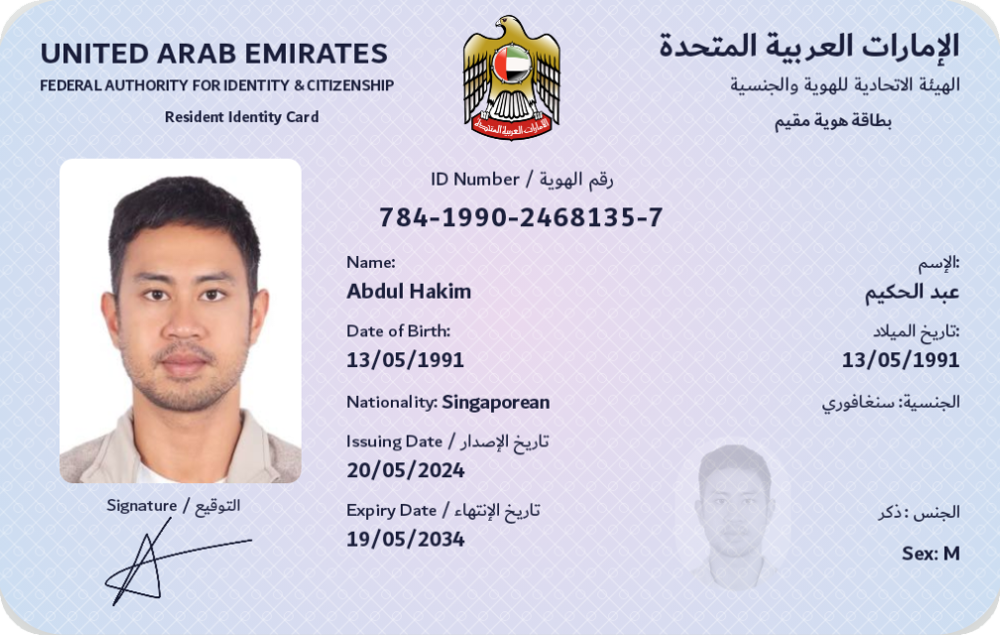
The Emirates ID in the wallet. The card is drawn from the signed data, not a photo of a card.
Other document types can be added: each is a list of fields with labels and a card design. See [Add your own document type](/wallet/quickstart/).
## One container, many documents
[Section titled “One container, many documents”](#one-container-many-documents)
All three use the same container, **ISO/IEC 18013-5 mdoc**, and the same ways of presenting it: QR code plus Bluetooth in person, OpenID for Verifiable Presentations and the browser’s Digital Credentials API online. A credential held in the SDK’s wallet can be checked by any standards-based verifier, and the SDK’s verifiers check credentials from other standards-based wallets. There is no lock-in format.
The technical details, field by field, are on the pages below and in [mdoc architecture](/platform/credentials/mdoc/).
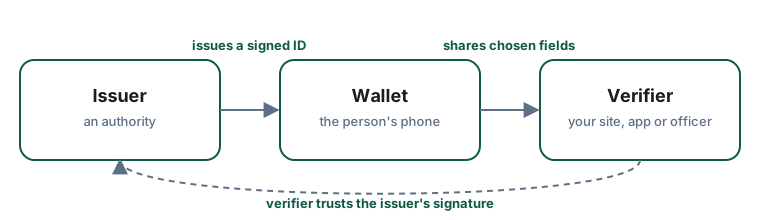
## Wallet, verifier, issuer
[Section titled “Wallet, verifier, issuer”](#wallet-verifier-issuer)
Every exchange involves three parties.
### Issuer
[Section titled “Issuer”](#issuer)
The authority that puts the credential in the wallet: a transport authority for a driving licence, the federal authority for an Emirates ID, a sports body for a competition licence. The issuer signs the credential and publishes the certificate verifiers need to check that signature.
The SDK does not issue credentials. The wallet receives them from an issuer over **OpenID for Verifiable Credential Issuance**. The demo wallet issues itself demo credentials so you can try everything without an issuer.
### Wallet (the holder)
[Section titled “Wallet (the holder)”](#wallet-the-holder)
The app on the person’s phone that holds credentials and presents them. It shows the person who is asking and for which fields, and releases nothing without their approval.
You build one with the [wallet SDK](/wallet/), or use the demo wallet app. The wallet in the Hello Mobile demo appears as **ICP Wallet**.
### Verifier (the relying party)
[Section titled “Verifier (the relying party)”](#verifier-the-relying-party)
Whoever needs to check the credential: your website, your in-person app, an officer. The verifier asks for specific fields, receives them, and checks:
1. the issuer’s signature and that the issuer is one it trusts;
2. that the credential is bound to the phone that presented it;
3. that the credential is valid today and not revoked.
You verify [in person](/in-person/) or [on your website](/web/).
### One device, one role at a time
[Section titled “One device, one role at a time”](#one-device-one-role-at-a-time)
An app can contain both a wallet and a verifier, but a phone plays one role per session: it either shows a QR code or scans one.
## Each credential
[Section titled “Each credential”](#each-credential)
* [Emirates ID](/platform/credentials/emirates-id/)
* [Mobile driving licence](/platform/credentials/mdl/)
* [Mobile competition licence](/platform/credentials/mcl/)
* [mdoc architecture](/platform/credentials/mdoc/): the container and the security mechanisms they share
# Emirates ID
> The Emirates ID demo profile - an ISO/IEC 23220 Photo ID mdoc with the fields the UAE resident identity card shows, drawn natively in the wallet.
**Status: project-defined demo profile on a standardised container.** The document type and namespaces are the ISO/IEC 23220 **Photo ID** standard, so any Photo-ID-capable verifier can request it; the *choice* of elements and the card design are this project’s, made to mirror the physical Emirates ID for demos. It is **not** approved, certified or issued by the UAE Federal Authority for Identity, Citizenship, Customs & Port Security (ICP), and all demo data is fictional.

## What is on it
[Section titled “What is on it”](#what-is-on-it)
| Field | Name to request | Example |
| ------------------------- | ----------------------------------- | -------------------------------------------------------------------- |
| Given names / family name | `given_name`, `family_name` | Abdul / Hakim |
| Name in Arabic | `given_name_viz`, `family_name_viz` | عبد / الحكيم |
| ID number | `person_id` | 784-1990-2468135-7 |
| Date of birth | `birth_date` | 1991-05-13 |
| Nationality | `nationality` | Singaporean |
| Sex | `sex` | Male |
| Photo | `portrait` | (image) |
| Card number | `document_number` | 118542367 |
| Issue / expiry dates | `issue_date`, `expiry_date` | 2024-05-20 / 2034-05-19 |
| Age checks | `age_over_18`, `age_over_21` | true |
| Issuing authority | `issuing_authority` | Federal Authority for Identity, Citizenship, Customs & Port Security |
All fields except `person_id` live in the standard namespace `org.iso.23220.1`; `person_id` is in `org.iso.23220.photoid.1`.
## Typical requests
[Section titled “Typical requests”](#typical-requests)
* **Identity** (a signup): given and family name, `person_id`, `birth_date`, `nationality`, `expiry_date`, `portrait`.
* **Age** (a door): `portrait`, `age_over_18`.
```ts
// web
Requests.photoId(['given_name', 'family_name', 'birth_date', 'nationality', 'expiry_date', 'portrait'], ['person_id'])
```
```kotlin
// in person
EmiratesId.IDENTITY_CHECK // or EmiratesId.AGE_OVER_21
```
## Where it is used
[Section titled “Where it is used”](#where-it-is-used)
* [Hello Mobile](/ecosystem/demos/#hello-mobile-website-emirates-id) verifies it online.
* The [Verify app](/in-person/) offers the identity and age checks in person.
* The demo wallet issues itself one on first run.
## Standards and references
[Section titled “Standards and references”](#standards-and-references)
* ISO/IEC 23220-2 (generic identity data elements, namespace `org.iso.23220.1`) and the Photo ID application profile (`org.iso.23220.photoid.1`).
* ISO/IEC 18013-5 container and mechanisms: see [mdoc architecture](/platform/credentials/mdoc/).
* ISO/IEC 5218 for `sex`.
## Doctype and namespaces
[Section titled “Doctype and namespaces”](#doctype-and-namespaces)
| | |
| --------- | -------------------------------------------------------------------------------- |
| docType | `org.iso.23220.photoid.1` (`DocTypes.PHOTO_ID`) |
| namespace | `org.iso.23220.1` (core identity elements) |
| namespace | `org.iso.23220.photoid.1` (Photo ID elements; `person_id` carries the ID number) |
Definition: `demo/brand-hakim/.../EmiratesId.kt` (`EmiratesId.type`, `EmiratesId.presets`).
## Attributes
[Section titled “Attributes”](#attributes)
Namespace `org.iso.23220.1`:
| Identifier | Meaning | CBOR | Required | Encoding | Example |
| -------------------------------- | --------------------------------------------------------- | --------- | -------- | ---------------------------------- | ------------------------------------------------------------------------ |
| `family_name` | family name, Latin | tstr | yes | as printed | `"Hakim"` |
| `given_name` | given names, Latin | tstr | yes | | `"Abdul"` |
| `family_name_viz` | family name as printed in the card’s visual zone (Arabic) | tstr | no | UTF-8 Arabic | `"الحكيم"` |
| `given_name_viz` | given names as printed (Arabic) | tstr | no | | `"عبد"` |
| `birth_date` | date of birth | full-date | yes | `tag 1004` `YYYY-MM-DD` | `1991-05-13` |
| `sex` | sex | uint | no | ISO/IEC 5218 (1 male, 2 female) | `1` |
| `nationality` | nationality | tstr | no | demo: adjective as printed | `"Singaporean"` |
| `birthplace` | place of birth | tstr | no | | `"Singapore"` |
| `portrait` | holder photo | bstr | yes | JPEG | (bytes) |
| `document_number` | card number | tstr | no | digits as printed on the card back | `"118542367"` |
| `issue_date` | issuing date | full-date | yes | | `2024-05-20` |
| `expiry_date` | expiry date | full-date | yes | | `2034-05-19` |
| `issuing_authority` | issuing authority | tstr | no | | `"Federal Authority for Identity, Citizenship, Customs & Port Security"` |
| `issuing_country` | issuing country | tstr | no | ISO 3166-1 alpha-2 | `"AE"` |
| `age_over_18`, `age_over_21` | age attestations | bool | no | derived at issuance | `true` |
| `age_in_years`, `age_birth_year` | age helpers | uint | no | derived at issuance | `33`, `1991` |
Namespace `org.iso.23220.photoid.1`:
| Identifier | Meaning | CBOR | Required | Encoding | Example |
| ----------- | ---------------------- | ---- | -------- | ------------------------------- | ---------------------- |
| `person_id` | the Emirates ID number | tstr | yes | `784-YYYY-NNNNNNN-C` as printed | `"784-1990-2468135-7"` |
Conventions specific to this profile: the Arabic name uses the standard `*_viz` (“visual inspection zone”) elements, since ISO 23220-2 has no dedicated national-character name elements; `nationality` holds the printed adjective rather than a country code so the card reads as printed. Both are documented choices, not standard requirements. Every value above is in the issued document and covered by the issuer signature; nothing is UI-only.
## Card field mapping
[Section titled “Card field mapping”](#card-field-mapping)
| On the card | Source | Kind |
| --------------------------------------------------------------------------- | ------------------------------------------------------------------ | ------------------------------- |
| UNITED ARAB EMIRATES / federal authority / Resident Identity Card (EN + AR) | fixed text | decorative |
| State emblem | asset supplied by the project owner | decorative |
| Portrait; faint secondary portrait | `portrait` (second copy faded, greyscale) | data |
| ID Number / رقم الهوية | `person_id` | data |
| Name / الإسم | `given_name` + `family_name`; `given_name_viz` + `family_name_viz` | data |
| Date of Birth / تاريخ الميلاد | `birth_date` as `dd/MM/yyyy` | derived format |
| Nationality / الجنسية | `nationality`; Arabic from a small lookup in the face | data / derived |
| Issuing Date, Expiry Date (EN + AR labels) | `issue_date`, `expiry_date` | derived format |
| Sex / الجنس | `sex` → M/F, ذكر/أنثى | derived |
| Signature / التوقيع | holder signature asset supplied by the project owner | decorative (not a data element) |
| Background print, Dubai typeface | drawn | decorative |
Face: `demo/brand-hakim/.../EmiratesIdFace.kt`.
## Issuance and provisioning
[Section titled “Issuance and provisioning”](#issuance-and-provisioning)
Demo: `EmiratesIdSeeder` builds the `NameSpacedData` above and `DemoIssuer` mints the mdoc on first run (validity 10 years), signed by the demo Document Signer under the demo IACA. A real deployment would issue over OpenID4VCI from the authority’s issuer; the wallet side (`issueFromOffer`) is the same.
## Issuer authentication and trust
[Section titled “Issuer authentication and trust”](#issuer-authentication-and-trust)
Verifiers trust the demo IACA (in the demo VICAL, which lists `org.iso.23220.photoid.1` for it); on the web the Verify API holds it per tenant. A VICAL entry that lists only the mDL doctype rejects this document, by design.
## Device binding and presentation
[Section titled “Device binding and presentation”](#device-binding-and-presentation)
Standard: the device key in the MSO signs the session transcript (proximity, OpenID4VP or DC-API). Device-tested online (Hello Mobile, via the Verify API); the in-person presets exist in the Verify app and await a two-phone test.
## Validity and revocation
[Section titled “Validity and revocation”](#validity-and-revocation)
Validity comes from the MSO window. The self-issued demo document carries no status reference, so verifiers report `revocationPublished = false`; an authority-issued document would use a status list.
## Selective-disclosure requests
[Section titled “Selective-disclosure requests”](#selective-disclosure-requests)
In person (`EmiratesId.presets`):
```kotlin
// Identity check
PresentationRequest(docType = DocTypes.PHOTO_ID, namespaces = mapOf(
"org.iso.23220.1" to setOf("portrait", "given_name", "family_name", "birth_date", "nationality", "expiry_date", "issuing_authority"),
"org.iso.23220.photoid.1" to setOf("person_id"),
))
// Age check: photo + age_over_18 only
```
Web (Hello Mobile):
```ts
Requests.photoId(['given_name', 'family_name', 'birth_date', 'nationality', 'expiry_date', 'portrait'], ['person_id'])
```
## Example (explanatory JSON, not CBOR)
[Section titled “Example (explanatory JSON, not CBOR)”](#example-explanatory-json-not-cbor)
```json
{
"docType": "org.iso.23220.photoid.1",
"org.iso.23220.1": {
"family_name": "Hakim", "given_name": "Abdul",
"family_name_viz": "الحكيم", "given_name_viz": "عبد",
"birth_date": "1991-05-13", "sex": 1, "nationality": "Singaporean", "birthplace": "Singapore",
"document_number": "118542367", "issue_date": "2024-05-20", "expiry_date": "2034-05-19",
"issuing_authority": "Federal Authority for Identity, Citizenship, Customs & Port Security",
"issuing_country": "AE", "age_over_18": true, "age_over_21": true,
"portrait": ""
},
"org.iso.23220.photoid.1": { "person_id": "784-1990-2468135-7" }
}
```
## Interoperability and open points
[Section titled “Interoperability and open points”](#interoperability-and-open-points)
* Any Photo-ID verifier can request the standard elements; `person_id` is the standard place for a national identifier, but another verifier may expect the ID number elsewhere.
* The Arabic name in `*_viz` and the adjective in `nationality` are this profile’s conventions.
* No official schema for a digital Emirates ID has been published for this project to follow; if one appears, this profile should be replaced by it.
* The iOS Digital Credentials sheet lists Photo ID only once the app’s provider entitlement includes `org.iso.23220.photoid.1`. The demo wallet does not offer it there: the Emirates ID is face-checked before sharing ([Prove it’s you](/wallet/prove-its-you/)) and an iOS extension has no camera, so it is shared from the wallet app only.
# Mobile competition licence (mCL)
> The EMSO competitor licence - a project-defined mdoc profile on ISO 23220 core elements plus an EMSO namespace, issued by Accredify Nexus.
**mCL** in this project means the **mobile competition licence** of the Emirates Motorsports Organization (EMSO): the licence a driver or rider holds to compete, with its grade and annual medical. It is not a commercial licence.
**Status: project-defined demo profile.** The container is standard (ISO/IEC 18013-5); the document type and the EMSO namespace are defined by this project with Accredify for the demo, and are not an official EMSO or UAE specification.
## What is on it
[Section titled “What is on it”](#what-is-on-it)
| Field | Name to request | Example |
| ------------------------- | --------------------------- | ----------------------------------- |
| Given names / family name | `given_name`, `family_name` | Abdul / Hakim |
| Date of birth | `birth_date` | 1991-05-13 |
| Photo | `portrait` | (image) |
| Licence number | `document_number` | EMSO-2026-00125 |
| Issue / expiry dates | `issue_date`, `expiry_date` | 2026-09-23 / 2026-12-31 |
| Grade | `licence_grade` | International Grade A Circuit (ITA) |
| Medical valid until | `medical_expiry` | 2026-12-31 |
| Seasons competed | `competition_seasons` | 3 |
Person fields are in `org.iso.23220.1`; the licence fields in `ae.emso.competitor_licence.1`. Document type: `ae.emso.competitor_licence.1.mCL`.
## Typical checks
[Section titled “Typical checks”](#typical-checks)
* **Valid medical** (a marshal at the paddock gate): `portrait`, names, `medical_expiry`, shown as one big Valid / Expired.
* **Licence check**: identity, number, dates, grade, medical, seasons.
```kotlin
EmsoLicence.VALID_MEDICAL
EmsoLicence.LICENCE_CHECK
```
## Who is who
[Section titled “Who is who”](#who-is-who)
The credential belongs to the **competitor**; EMSO is the **issuer**. A presentation proves the holder has the phone the licence was issued to, and the photo lets the marshal confirm it is the same person.
## Standards and references
[Section titled “Standards and references”](#standards-and-references)
* ISO/IEC 18013-5 container and mechanisms ([mdoc architecture](/platform/credentials/mdoc/)).
* ISO/IEC 23220-2 core elements for the person (`org.iso.23220.1`).
* OpenID4VCI (pre-authorised code flow) for issuance by Accredify Nexus (UAT).
## Doctype and namespaces
[Section titled “Doctype and namespaces”](#doctype-and-namespaces)
| | |
| --------- | --------------------------------------------------- |
| docType | `ae.emso.competitor_licence.1.mCL` |
| namespace | `org.iso.23220.1` (who the holder is) |
| namespace | `ae.emso.competitor_licence.1` (the licence itself) |
Definition: `demo/brand-hakim/.../EmsoLicence.kt`.
## The organisation and the individual
[Section titled “The organisation and the individual”](#the-organisation-and-the-individual)
The credential is about the **individual competitor**: the person’s identity elements, portrait and device-bound key are theirs. The **licensed organisation** appears as the issuer: EMSO is the `issuing_authority`, and the document is signed by the issuer’s Document Signer under the Accredify Nexus IACA. Presenter authority is established the standard way: the presentation is signed with the device key bound in the MSO (only the holder’s phone can do that), and the verifier face-matches the disclosed `portrait`. There is no delegation model: an official cannot present on a competitor’s behalf.
## Attributes
[Section titled “Attributes”](#attributes)
Namespace `org.iso.23220.1`:
| Identifier | Meaning | CBOR | Required | Encoding | Example |
| --------------------------- | ---------------- | --------- | -------- | ---------- | ------------------------------------- |
| `family_name`, `given_name` | names | tstr | yes | | `"Hakim"`, `"Abdul"` |
| `birth_date` | date of birth | full-date | yes | `tag 1004` | `1991-05-13` |
| `portrait` | photo | bstr | yes | JPEG | (bytes) |
| `portrait_capture_date` | | tdate | no | | |
| `document_number` | licence number | tstr | no | | `"EMSO-2026-00125"` |
| `issue_date`, `expiry_date` | licence validity | full-date | yes | | `2026-09-23`, `2026-12-31` |
| `age_over_18` | | bool | no | | `true` |
| `issuing_authority` | | tstr | no | | `"Emirates Motorsports Organization"` |
Namespace `ae.emso.competitor_licence.1`:
| Identifier | Meaning | CBOR | Required | Encoding | Example |
| --------------------- | -------------------------- | --------- | -------- | ------------------- | --------------------------------------- |
| `licence_grade` | competition grade | tstr | no | free text as issued | `"International Grade A Circuit (ITA)"` |
| `medical_expiry` | annual medical valid until | full-date | no | `tag 1004` | `2026-12-31` |
| `competition_seasons` | seasons competed | uint | no | | `3` |
All values are issued by Nexus and signed; the wallet’s `expiredBadge` on `medical_expiry` (“Medical expired”) is derived at display time from the signed date.
## Card field mapping
[Section titled “Card field mapping”](#card-field-mapping)
| On the card | Source | Kind |
| ------------------------------------------------------------------ | ---------------------------- | -------------- |
| EMSO logo; COMPETITOR LICENCE / رخصة متسابق / UNITED ARAB EMIRATES | fixed | decorative |
| Portrait | `portrait` | data |
| LICENCE NO. | `document_number` | data |
| NAME | `given_name` + `family_name` | data |
| GRADE | `licence_grade` | data |
| DATE OF BIRTH, EXPIRES | `birth_date`, `expiry_date` | derived format |
| MEDICAL VALID UNTIL | `medical_expiry` | derived format |
| Signature | holder signature asset | decorative |
## Issuance and provisioning
[Section titled “Issuance and provisioning”](#issuance-and-provisioning)
Accredify Nexus (UAT) issues the mCL over **OpenID4VCI**: the holder scans the offer QR from the Nexus UI; the wallet redeems the pre-authorised code (no transaction code), proves the device key, and stores the signed mdoc. Nexus accepts Bearer tokens only, so the SDK’s `DpopPolicy.ALLOW_BEARER_FALLBACK` applies (a documented interop gap, to be removed when Nexus supports DPoP).
## Issuer authentication and trust
[Section titled “Issuer authentication and trust”](#issuer-authentication-and-trust)
Chain: Nexus DS → **Accredify Nexus IACA (UAT)**. The demo VICAL lists that IACA with the mCL, mDL and Photo ID doctypes; verifiers may also pin the IACA PEM directly.
## Device binding, presentation, validity, revocation
[Section titled “Device binding, presentation, validity, revocation”](#device-binding-presentation-validity-revocation)
Standard (see [mdoc architecture](/platform/credentials/mdoc/)). Validity is the MSO window; revocation works when Nexus includes a status reference in the MSO (then the verifier shows Revoked and “Last established”); a revocation round trip has not yet been exercised end to end.
## Selective-disclosure requests
[Section titled “Selective-disclosure requests”](#selective-disclosure-requests)
```kotlin
EmsoLicence.VALID_MEDICAL // portrait, names, issuing_authority + medical_expiry → one big Valid / Expired
EmsoLicence.LICENCE_CHECK // identity, number, dates + grade, medical, seasons → details
```
## Example (explanatory JSON, not CBOR)
[Section titled “Example (explanatory JSON, not CBOR)”](#example-explanatory-json-not-cbor)
```json
{
"docType": "ae.emso.competitor_licence.1.mCL",
"org.iso.23220.1": {
"family_name": "Hakim", "given_name": "Abdul", "birth_date": "1991-05-13",
"document_number": "EMSO-2026-00125", "issue_date": "2026-09-23", "expiry_date": "2026-12-31",
"issuing_authority": "Emirates Motorsports Organization", "portrait": ""
},
"ae.emso.competitor_licence.1": {
"licence_grade": "International Grade A Circuit (ITA)", "medical_expiry": "2026-12-31", "competition_seasons": 3
}
}
```
## Interoperability and open points
[Section titled “Interoperability and open points”](#interoperability-and-open-points)
* Only verifiers that know this doctype can request it (the Verify app does; the web SDK can with a custom request). Other wallets will store it as an unknown document type.
* Issuer `display` name/logo in Nexus metadata and DPoP support are open asks to Accredify.
# Mobile driving licence (mDL)
> The ISO/IEC 18013-5 mDL as held, shown, presented and verified by the SDK, with the demo's RTA-styled card.
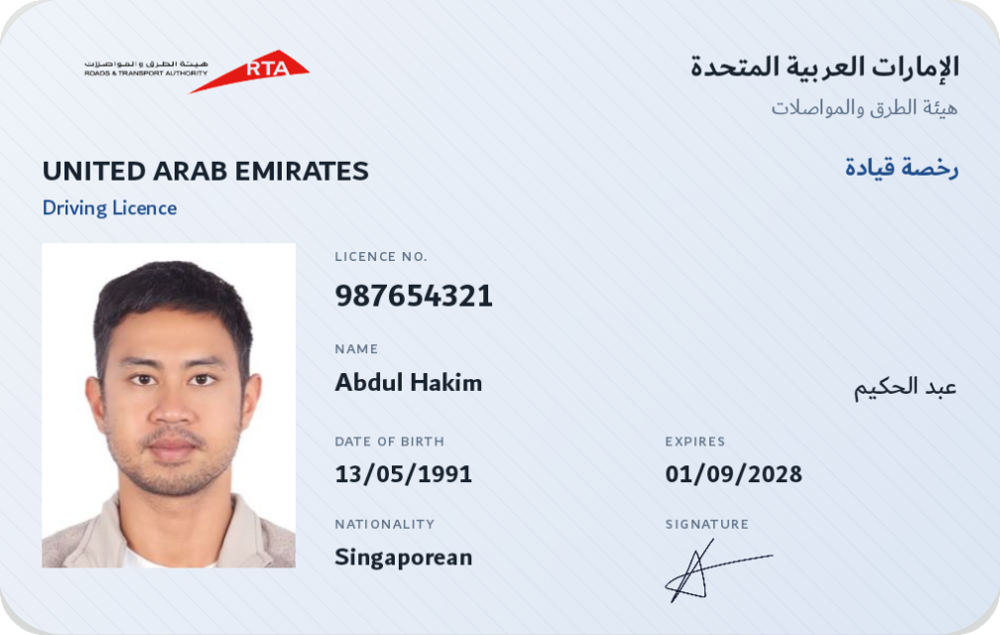
**Status: standardised profile.** The mDL is the document type ISO/IEC 18013-5 defines. The SDK adds nothing to its schema; the demo only chooses values and a card design. The RTA-styled card is a demo design, not an official RTA product.
## What is on it
[Section titled “What is on it”](#what-is-on-it)
The standard defines the full set; the ones you will usually ask for:
| Field | Name to request | Example |
| --------------------------- | ----------------------------------------------------------------- | ----------------------------- |
| Given names / family name | `given_name`, `family_name` | Abdul / Hakim |
| Name in Arabic | `given_name_national_character`, `family_name_national_character` | عبد / الحكيم |
| Date of birth | `birth_date` | 1991-05-13 |
| Licence number | `document_number` | 987654321 |
| Issue / expiry dates | `issue_date`, `expiry_date` | 2024-03-15 / 2028-09-01 |
| Categories | `driving_privileges` | B, from 2024-03-15 |
| Photo | `portrait` | (image) |
| Signature | `signature_usual_mark` | (image) |
| Age checks | `age_over_18`, `age_over_21` | true |
| Issuing authority / country | `issuing_authority`, `issuing_country` | Road Transport Authority / AE |
Namespace: `org.iso.18013.5.1`.
## Typical requests
[Section titled “Typical requests”](#typical-requests)
* **Car rental**: names, `portrait`, `age_over_21`, `document_number`, `expiry_date` (what DriveNow asks for).
* **Roadside**: `RequestPresets.MDL_DRIVER_CHECK` (identity, number, categories).
* **Age only**: `portrait`, `age_over_18`.
```ts
Requests.mdl(['family_name', 'given_name', 'portrait', 'age_over_21', 'document_number', 'expiry_date'])
```
## Where it is used
[Section titled “Where it is used”](#where-it-is-used)
* [DriveNow](/web/same-device/) verifies it online, including through the browser’s Digital Credentials API.
* The Verify app offers the age and licence checks in person.
## Standards and references
[Section titled “Standards and references”](#standards-and-references)
* ISO/IEC 18013-5:2021, clause 7 (data model) and Annex A/B (encoding, PKI).
* Container, presentation, trust and revocation: [mdoc architecture](/platform/credentials/mdoc/).
## Doctype and namespaces
[Section titled “Doctype and namespaces”](#doctype-and-namespaces)
| | |
| --------- | ----------------------------------------------------------------- |
| docType | `org.iso.18013.5.1.mDL` (`DocTypes.MDL`) |
| namespace | `org.iso.18013.5.1` (all standard elements) |
| namespace | `org.iso.18013.5.1.aamva` (AAMVA extension; not used by the demo) |
## Attributes (standard, as issued by the demo)
[Section titled “Attributes (standard, as issued by the demo)”](#attributes-standard-as-issued-by-the-demo)
The demo issues the **full ISO element set** with realistic sample values, overriding the ones a believable UAE licence needs. Required = mandatory in ISO/IEC 18013-5 Table 5.
| Identifier | Meaning | CBOR | Required | Encoding | Example |
| ---------------------------------------------------------------------------------------------------------------------------------------------------------------------------------------------------------------------------------------------------------------------------------------------------------------------------------------------------------------------------------------------------------------------------- | --------------------- | ----------------- | -------- | ---------------------- | ------------------------------------------------------------------------------ |
| `family_name`, `given_name` | names | tstr | yes | Latin | `"Hakim"`, `"Abdul"` |
| `birth_date` | date of birth | full-date | yes | `tag 1004` | `1991-05-13` |
| `issue_date`, `expiry_date` | licence validity | full-date / tdate | yes | | `2024-03-15`, `2028-09-01` |
| `issuing_country` | | tstr | yes | ISO 3166-1 alpha-2 | `"AE"` |
| `issuing_authority` | | tstr | yes | | `"Road Transport Authority"` |
| `document_number` | licence number | tstr | yes | | `"987654321"` |
| `portrait` | | bstr | yes | JPEG | (bytes) |
| `driving_privileges` | categories with dates | array of maps | yes | ISO 18013-5 7.2.4 | `[{vehicle_category_code:"B", issue_date:…, expiry_date:…}]` |
| `un_distinguishing_sign` | | tstr | yes | | `"UAE"` |
| `administrative_number`, `sex`, `height`, `weight`, `eye_colour`, `hair_colour`, `birth_place`, `resident_address`, `portrait_capture_date`, `age_in_years`, `age_birth_year`, `age_over_18`, `age_over_21`, `issuing_jurisdiction`, `nationality`, `resident_city`, `resident_state`, `resident_postal_code`, `resident_country`, `family_name_national_character`, `given_name_national_character`, `signature_usual_mark` | optional elements | as per ISO | no | as per ISO | `sex: 1`, `nationality: "Singaporean"`, `given_name_national_character: "عبد"` |
| `biometric_template_*` | | bstr | no | not issued by the demo | – |
Local extensions: none. The AAMVA namespace is not populated.
## Card field mapping
[Section titled “Card field mapping”](#card-field-mapping)
| On the card | Source | Kind |
| ---------------------------------------------------------- | ------------------------------------------------------------------ | -------------- |
| RTA logo; UNITED ARAB EMIRATES / Driving Licence (EN + AR) | fixed | decorative |
| Portrait | `portrait` | data |
| LICENCE NO. | `document_number` | data |
| NAME | `given_name` + `family_name` | data |
| Arabic name | `given_name_national_character` + `family_name_national_character` | data |
| DATE OF BIRTH, EXPIRES | `birth_date`, `expiry_date` as `dd/MM/yyyy` | derived format |
| NATIONALITY | `nationality` | data |
| Signature | holder signature asset | decorative |
Face: `demo/brand-hakim/.../CardFaces.kt` (`RtaDrivingLicenceFace`).
## Issuance and provisioning
[Section titled “Issuance and provisioning”](#issuance-and-provisioning)
Demo: `MdlSeeder` + `DemoIssuer` self-issue on first run (validity 1 year) under the demo IACA. Real: OpenID4VCI from the licensing authority’s issuer.
## Trust, presentation, validity
[Section titled “Trust, presentation, validity”](#trust-presentation-validity)
As in [mdoc architecture](/platform/credentials/mdoc/). The demo VICAL lists the mDL doctype for the demo IACA. Verified in person by the Verify app, online by DriveNow (OpenID4VP and the DC API).
## Selective-disclosure requests
[Section titled “Selective-disclosure requests”](#selective-disclosure-requests)
```kotlin
RequestPresets.MDL_AGE_OVER_18 // portrait, age_over_18, issuing_authority → one big Yes/No
RequestPresets.MDL_DRIVER_CHECK // the SDK's core element set
```
```ts
Requests.mdl(['family_name', 'given_name', 'portrait', 'age_over_21', 'document_number', 'expiry_date']) // DriveNow
```
## Example (explanatory JSON, not CBOR)
[Section titled “Example (explanatory JSON, not CBOR)”](#example-explanatory-json-not-cbor)
```json
{
"docType": "org.iso.18013.5.1.mDL",
"org.iso.18013.5.1": {
"family_name": "Hakim", "given_name": "Abdul", "birth_date": "1991-05-13",
"issue_date": "2024-03-15", "expiry_date": "2028-09-01",
"issuing_country": "AE", "issuing_authority": "Road Transport Authority",
"document_number": "987654321", "un_distinguishing_sign": "UAE",
"driving_privileges": [{ "vehicle_category_code": "B", "issue_date": "2024-03-15", "expiry_date": "2028-09-01" }],
"age_over_18": true, "age_over_21": true, "portrait": ""
}
}
```
## Interoperability
[Section titled “Interoperability”](#interoperability)
Fully standard: the demo mDL has been verified by independent third-party online verifiers and by the Verify API (the DriveNow fixture test). The iOS Digital Credentials sheet shows it for `org-iso-mdoc` requests.
# mdoc architecture
> What every credential in the SDK shares - the ISO/IEC 18013-5 mdoc container, device binding, session transcripts, trust lists, revocation - and where each mechanism lives in the code.
All three credential profiles ([Emirates ID](/platform/credentials/emirates-id/), [mDL](/platform/credentials/mdl/), [mCL](/platform/credentials/mcl/)) use the same container and the same security mechanisms. This page describes those once; each profile page only adds its own document type, namespaces and attributes.
**Standard vs. ours.** Everything in this page is standard ISO/IEC 18013-5 behaviour. The profile pages say clearly which parts are standardised schemas (mDL, Photo ID) and which are project-defined (mCL, and the Emirates ID *data choices* on top of Photo ID). Nothing here is certified or approved by any authority.
## Versions and references
[Section titled “Versions and references”](#versions-and-references)
| | |
| --------------------------------- | -------------------------------------------------------------------------------------------------------------- |
| Container, proximity, trust lists | ISO/IEC 18013-5:2021 (mDL and the `mso_mdoc` format); RICAL from the 2nd-edition draft |
| Online presentation | OpenID4VP (Draft 24 `openid4vp` and Draft 29 `openid4vp-v1-*`); ISO/IEC 18013-7 for the DC-API transcript |
| Browser transport | W3C Digital Credentials API (`org-iso-mdoc` on iOS; `openid4vp` on Android/Chrome) |
| Issuance | OpenID4VCI (pre-authorised code flow) |
| Photo ID data model | ISO/IEC 23220-2 (namespace `org.iso.23220.1`) and the Photo ID application profile (`org.iso.23220.photoid.1`) |
| Signing / encoding | COSE (RFC 9052/9053), CBOR (RFC 8949) |
| Revocation | IETF Token Status List (draft) |
Assumptions: single-issuer documents; EC P-256 keys (`ES256` / `ESP256`); SHA-256 digests.
## The container
[Section titled “The container”](#the-container)
An mdoc is a `Document`:
* `docType`: the document type string, e.g. `org.iso.18013.5.1.mDL`.
* `IssuerSigned`: the data, as `IssuerSignedItem`s grouped by **namespace**, each item carrying a random salt, a digest id, the element identifier and its CBOR value; plus `issuerAuth`, a COSE\_Sign1 over the **Mobile Security Object (MSO)**.
* The **MSO** holds the digest of every item (so a verifier can check integrity of whatever subset is disclosed), the document’s validity window (`validFrom` / `validUntil`), the **device key** the document is bound to, and optionally a status reference for revocation.
* `DeviceSigned`: at presentation time, the holder signs (or MACs) the session with the device key.
Selective disclosure follows: the holder sends only the requested `IssuerSignedItem`s; the verifier recomputes their digests and matches them against the signed MSO.
## Issuance and provisioning
[Section titled “Issuance and provisioning”](#issuance-and-provisioning)
Real issuance is **OpenID4VCI**: the wallet receives a credential offer (`openid-credential-offer://`), fetches issuer metadata, obtains an access token (DPoP-bound; a Bearer fallback exists for issuers that do not support DPoP), proves possession of a fresh device key, and receives the signed mdoc. `WalletClient.issueFromOffer` drives it. The EMSO mCL is issued this way by Accredify Nexus.
The demo mDL and Emirates ID are **self-issued in the demo apps** (`DemoIssuer`): the same MSO construction, signed by a fixed demo Document Signer under a fixed demo IACA. This exists only so the demos work without an issuer; the SDK ships no issuance keys.
## Issuer authentication and trust
[Section titled “Issuer authentication and trust”](#issuer-authentication-and-trust)
`issuerAuth` carries the Document Signer (DS) certificate in `x5chain`. The verifier builds the chain to a trusted **IACA** (Issuer Authority CA). Trust comes from `TrustConfig`: raw IACA PEMs, or a signed **VICAL** (list of IACAs, each with the doctypes it may sign; a document of another doctype is rejected even if the chain is valid). On the web the Verify API holds the issuer list per tenant.
Reader authentication runs the other way: a verifier signs its request (proximity `DeviceRequest`, or the OpenID4VP request JWT with `x5c`), and the wallet checks it against `TrustConfig.readerRical` / `readerRootsPem` to name the requester on the consent screen.
## Device binding and presentation verification
[Section titled “Device binding and presentation verification”](#device-binding-and-presentation-verification)
Every presentation is bound to a **session transcript** so a captured response cannot be replayed:
| Channel | Transcript | Where |
| ------------------------------- | ---------------------------------------------------------------- | -------------------------------------------------------- |
| Proximity (QR engagement + BLE) | `SessionTranscript(DeviceEngagement, EReaderKey, Handover=null)` | `MdocProximityPresenter` / `MdocReaderSession` |
| OpenID4VP `direct_post` | OpenID4VP handover over `client_id`, `nonce`, `response_uri` | `Openid4VpTranscript`; web `SessionTranscript.forOid4Vp` |
| Digital Credentials API | DC-API handover over browser `origin` and `nonce` | web `SessionTranscript.forOid4VpDcApi` |
The verifier checks, in order: issuer chain to a trusted IACA (for this doctype), the MSO signature, each disclosed item’s digest, the validity window, the device signature over the transcript with the MSO’s device key, then revocation. Native code gets an `AcceptanceResult`; the web server gets the same signals as JSON. A single failed check rejects the presentation.
## Validity and revocation
[Section titled “Validity and revocation”](#validity-and-revocation)
`validFrom` / `validUntil` come from the MSO (not from the printed expiry date, which is data). When the MSO carries a status reference, `RevocationResolver` fetches and caches the issuer’s status list; offline, the last answer is used and flagged stale (`revocationDataStale`, `revocationCheckedAt`). Documents without a status reference report `revocationPublished = false`.
## Requests
[Section titled “Requests”](#requests)
A request names the doctype and the elements per namespace:
* native: `PresentationRequest(docType, namespaces = mapOf(ns to setOf(elements)))`, wrapped in a `RequestPreset` for operators;
* web: DCQL built by `Requests.mdl(...)`, `Requests.photoId(...)` or a custom `{ docType, claims: [{ namespace, element }] }`.
Ask for the minimum. Age checks use `age_over_NN` booleans, never the birth date.
## Where in the code
[Section titled “Where in the code”](#where-in-the-code)
| Mechanism | Native (`sdk-core`) | Web (Verify API) |
| ----------------------- | -------------------------------------------- | --------------------------------------- |
| Document types / labels | `CredentialType` → `DocumentTypes.kt` | `request.ts` |
| Present | `MdocPresenter`, `MdocProximityPresenter` | – |
| Verify | `MdocVerifier`, `VerifierClient.verify` | `verify.ts` |
| Trust | `IssuerTrustStore`, `ReaderTrustStore` | `trust.iacas`, reader identity |
| Revocation | `RevocationResolver` | (status validation off in this version) |
| Transcripts | `ProximityTranscript`, `Openid4VpTranscript` | `SessionTranscript.forOid4Vp*` |
## Explanatory JSON
[Section titled “Explanatory JSON”](#explanatory-json)
Examples in the profile pages show data as JSON for readability. On the wire everything is CBOR: dates are `full-date` (`tag 1004`) or `tdate` strings, portraits are byte strings (`bstr`), and booleans / integers are native CBOR types.
# Errors and states
> Every state a website session can be in, every decision an in-person check can end with, and what to do about each.
## Website sessions
[Section titled “Website sessions”](#website-sessions)
| `state` | Meaning | What to do |
| ----------- | ----------------------------------------------------------------- | ------------------------------------------------------- |
| `waiting` | started, no answer yet | keep polling; the box does this for you |
| `verified` | the wallet’s answer passed every check; `claims` holds the fields | read it on your server with the secret key and continue |
| `failed` | an answer arrived but did not pass; `error` says why | show a retry; log `error` |
| `cancelled` | the holder dismissed the request in the wallet | offer to try again |
| `expired` | the request window passed, or the session id is unknown | the box shows Refresh and starts a new session |
Common `error` values on `failed`:
| `error` contains | Cause | Fix |
| ------------------- | ----------------------------------------------------------- | ---------------------------------------------------------------------------------- |
| `issuer` or `trust` | the credential’s issuer is not on your tenant’s list | ask us to add the issuer, or the holder has a credential from an unexpected issuer |
| `signature` | the issuer signature or the device signature did not verify | an old or tampered wallet build; retry with a current wallet |
| `expired` | the credential itself has expired | the holder needs a renewed credential |
| `docType` | the wallet answered with a different document type | the holder picked the wrong card; ask again |
Rules: an expired session never becomes verified (HTTP 410); a second submission returns the first result; a late “closed” never overrides a result; unknown ids read as expired.
## In-person checks
[Section titled “In-person checks”](#in-person-checks)
| `decision` | Meaning | What the operator does |
| -------------- | ---------------------------------------------------------------------------------------------- | --------------------------------------------------- |
| `ACCEPT` | signature valid, issuer trusted, within validity, not revoked | proceed; compare the portrait |
| `REJECT` | one of those failed; `reason` says which | refuse; the reason is shown on the result screen |
| `INCONCLUSIVE` | the checks passed but the revocation status could not be established (offline, no status data) | follow your policy: accept, retry online, or refuse |
Session states before the result: `AwaitingEngagement` → `Connecting` → `Verifying` → `Done` or `Failed` (Bluetooth dropped, the holder cancelled, no matching credential).
## Wallet app
[Section titled “Wallet app”](#wallet-app)
| Where | State | Meaning |
| ---------- | -------------------------------------------------------------------------- | ------------------------------------------------------------------------------------------------------------------------ |
| Issuing | `SdkResult.Failure` from `previewOffer` / `issueFromOffer` | the offer is invalid, expired, or the issuer refused; `error.message` says which |
| Presenting | `PresentmentState.Failed` with `DECLINED` | the holder chose not to share, or backed out of the face check |
| Presenting | `PresentmentState.Failed` with `UNSUPPORTED` | no held credential matches the request |
| Presenting | `PresentmentState.Failed` with `FACE_CHECK_FAILED` | the live face did not match the credential’s photo (after the allowed tries); nothing was shared |
| Presenting | `PresentmentState.Failed` with `FACE_CHECK_UNAVAILABLE` | the face check could not run: no usable photo on the credential, no camera, or camera access refused; nothing was shared |
| Preparing | `SdkResult.Failure` from `prepareForSharing` with `FACE_CHECK_UNAVAILABLE` | the credential’s photo has no usable face; warn the holder before they need to share |
# Glossary
> The terms used in these docs, in plain words.
**Verifiable credential** — an electronic identity document (driving licence, Emirates ID, competition licence) signed by its issuer and stored in a wallet.
**mdoc** — the ISO/IEC 18013-5 container all credentials here use; “mDL” is the driving licence in that container.
**Holder** — the person whose credential it is; their phone runs the **wallet**.
**Issuer** — the authority that signs and hands out credentials.
**Verifier / relying party** — whoever checks a credential: your website, your app, an officer.
**Presentation** — the act of sharing selected fields from a credential with a verifier.
**Selective disclosure** — sharing only the fields requested (over 21, not the birth date).
**Device binding** — the credential is tied to a key that never leaves the holder’s phone; a presentation is signed with it, so copies and replays fail.
**Session transcript** — the data both sides sign so a presentation belongs to this exchange only.
**IACA** — Issuer Authority Certificate Authority: an issuer’s root certificate.
**VICAL** — a signed list of trusted issuer certificates and the document types each may sign.
**RICAL** — a signed list of trusted verifier (reader) certificates with display names.
**Reader certificate** — the certificate a verifier signs its requests with; wallets use it to name the verifier.
**OpenID4VCI** — the protocol wallets use to receive credentials from issuers.
**OpenID4VP** — the protocol websites use to request a presentation online.
**Digital Credentials API** — the browser feature that lets a website ask the phone’s wallets directly (Safari’s “share your ID” sheet).
**App Link / Universal Link** — an `https://` link Android or iOS opens directly in an app; used for same-device tap-to-open.
**Publishable key / secret key** — Verify API credentials: the first goes in the page, the second stays on your server.
**Preset** — a named check an operator can pick in the in-person app.
# Install & versions
> What is in the SDK zip, requirements per platform, how to add the SDK to a web, Android or iOS project, native configuration, and the llms.txt files.
The SDK is delivered as one **zip** file. One version number covers every platform, and every part in the zip was built and tested together.
```plaintext
wallet-sdk-0.7.0.zip
├── web/ wallet-verify-0.7.0.tgz the element (npm package @wallet/verify)
├── android/ a local Maven repository com.wallet.sdk:sdk-core, sdk-ui-compose, sdk-face
├── ios/ Wallet.xcframework, compose-resources/ the SDK and its ready-made screens (device + simulator)
│ └── face/ Wallet.xcframework + WalletFace.podspec the same, plus the face check (CocoaPods, iOS 16)
├── models/ facenet_512.tflite the face check's model, if you use it
├── docs/ this documentation as Markdown, plus llms.txt and llms-full.txt for AI tools
└── README.md
```
You do not need every part. A website needs `web/` only; an in-person app needs `android/` or `ios/`.
## Requirements
[Section titled “Requirements”](#requirements)
| Platform | Minimum | Notes |
| -------- | ------------------------------------------------------------------------ | ---------------------------------------------------------------------------------------------------------------------- |
| Web | any framework or plain HTML; Node.js 20+ to install the package | the element is a standard web component; the verifier side is the [Verify API](/reference/hosted-api/), nothing to run |
| Android | `minSdk 26` (Android 8.0), JDK 17, Kotlin 2.2, Android Gradle Plugin 8.x | Jetpack Compose for the ready-made screens; hardware-backed keys via Android Keystore |
| iOS | iOS 15+, Xcode 16+ | iOS 26 for the Digital Credentials provider extension; keys in the Secure Enclave |
Bluetooth and camera permissions are requested by the ready-made screens when needed.
## Web
[Section titled “Web”](#web)
1. Copy the `.tgz` into your project (for example `vendor/`) and install it. The version is in the file name, so a later update is a new file and a new `npm install`.
```bash
npm install ./vendor/wallet-verify-0.7.0.tgz
```
2. Import the package once in browser code. Importing registers the `` element.
```js
import '@wallet/verify'
```
In Next.js or any server-rendered framework, import it from a client component or inside `useEffect`, because it needs the DOM:
```tsx
'use client'
import { useEffect } from 'react'
export function VerifyStep() {
useEffect(() => { import('@wallet/verify') }, [])
return
}
```
3. TypeScript users get the element type from the package:
```ts
import type { WalletVerifyElement, VerifyResult } from '@wallet/verify'
```
Continue with the [website Quickstart](/web/quickstart/).
## Android (Android Studio)
[Section titled “Android (Android Studio)”](#android-android-studio)
1. **Put the SDK next to your project.** Unzip `android/` into your project folder as `vendor/wallet-maven/`. It is a normal Maven repository.
2. **Tell Gradle where it is.** Open `settings.gradle.kts` and add the folder to the repositories:
```kotlin
dependencyResolutionManagement {
repositories {
maven { url = uri("vendor/wallet-maven") } // the Wallet SDK
google()
mavenCentral()
}
}
```
3. **Add the libraries.** Open your app module’s `build.gradle.kts` and add:
```kotlin
dependencies {
implementation("com.wallet.sdk:sdk-core:0.7.0") // the SDK: wallet + verifier
implementation("com.wallet.sdk:sdk-ui-compose:0.7.0") // the ready-made screens (optional)
implementation("androidx.activity:activity-compose:1.9.3")
implementation("androidx.fragment:fragment-ktx:1.8.5") // the screens are hosted in a FragmentActivity
}
```
4. **Click Sync Now** in the bar Android Studio shows at the top of the editor.
5. **Check it worked:** in any Kotlin file, type `import com.wallet.Wallet`. It resolves (no red text), and **Build → Make Project** succeeds.
Host the ready-made screens in a `FragmentActivity` rather than a plain `ComponentActivity`. The SDK’s libraries declare their own permissions (camera, Bluetooth), so you don’t need to change the manifest to verify in person. A wallet app also registers the link and credential-offer entry points described in [Present](/wallet/present/).
## iOS (Xcode)
[Section titled “iOS (Xcode)”](#ios-xcode)
1. **Add the framework.** Drag `ios/Wallet.xcframework` onto your project in the navigator (tick **Copy items if needed** and your app target). Then select the target, open the **General** tab, and under **Frameworks, Libraries, and Embedded Content** set it to **Embed & Sign**.
2. **Link SQLite.** In the **Build Settings** tab, search for *Other Linker Flags* and add `-lsqlite3`.
3. **Add the screens’ texts and icons.** Drag `ios/compose-resources` onto the project and choose **Create folder references** (it shows as a blue folder), with your app target ticked.
4. **Explain the camera and Bluetooth.** In the **Info** tab, under *Custom iOS Target Properties*, add `NSCameraUsageDescription` and `NSBluetoothAlwaysUsageDescription` with a sentence each; the screens ask for both. Add `CADisableMinimumFrameDurationOnPhone` = `YES` for smooth 120 Hz scrolling.
5. **Check it worked:** add `import Wallet` to a Swift file and press **⌘B**. The build succeeds, and `Wallet.shared` autocompletes.
The ready-made screens are `UIViewController`s, such as `WalletViewControllersKt.WalletViewController(sdk:)` and `WalletViewControllersKt.WalletVerifyViewController(sdk:presets:title:)`; in SwiftUI, wrap one in a `UIViewControllerRepresentable` ([wallet Quickstart](/wallet/quickstart/)). A wallet app also adds a URL scheme and an Associated Domain for links from websites, and (iOS 26) an App Group with the Digital Credentials extension: see [Present](/wallet/present/). For the face check, use `ios/face/` instead of the plain framework: see [Prove it’s you](/wallet/prove-its-you/).
## Updating
[Section titled “Updating”](#updating)
* Web: install the new `.tgz`; the version in the file name changes.
* Android: replace the `vendor/wallet-maven` folder and bump the version in `build.gradle.kts`.
* iOS: replace `Wallet.xcframework` and `compose-resources`.
Keep all three on the same version when you use more than one; the trust lists and document types are shared.
## Versions
[Section titled “Versions”](#versions)
| Part | Coordinates | Current |
| ---------- | ------------------------------------------------------------------------------------------------------------------------------------------------------------------------- | ------- |
| Web | `@wallet/verify` (`wallet-verify-.tgz`) | 0.7.0 |
| Android | `com.wallet.sdk:sdk-core`, `com.wallet.sdk:sdk-ui-compose`, `com.wallet.sdk:sdk-face` (optional, face check) | 0.7.0 |
| iOS | `Wallet.xcframework` (SDK + ready-made screens) with `compose-resources/`; `ios/face/Wallet.xcframework` + `WalletFace.podspec` (optional, face check; iOS 16, CocoaPods) | 0.7.0 |
| Model | `models/facenet_512.tflite` (the face check’s model, shipped by your app) | — |
| Verify API | `https://hakim-verify-api.vercel.app/v1` | v1 |
## Licence and distribution
[Section titled “Licence and distribution”](#licence-and-distribution)
The SDK is proprietary and distributed under your agreement; the zip is not published to a public package registry. Ask us for a new zip when you need an update, or see [Support](/platform/support/).
Everything lives in `com.wallet.*` (Kotlin) and is exported unchanged to Swift through the `Wallet` framework. Full signatures, generated from the source: API reference for [Android (Kotlin)](/reference/kotlin/) and [iOS (Swift)](/reference/ios/documentation/wallet/).
```kotlin
import com.wallet.Wallet
import com.wallet.WalletSdk
import com.wallet.config.* // SdkConfig, IssuerConfig, TrustConfig, ReaderIdentityConfig, …
import com.wallet.model.* // PresentationRequest, RequestPreset, CredentialType, DocTypes, …
import com.wallet.ui.* // WalletScreen, WalletVerifyScreen, WalletBranding (sdk-ui-compose)
```
## Native configuration
[Section titled “Native configuration”](#native-configuration)
### `Wallet.create(SdkConfig)`
[Section titled “Wallet.create(SdkConfig)”](#walletcreatesdkconfig)
| Field | Meaning |
| --------------------------------------- | ----------------------------------------------------------------------------------------------------------------------------------------------------------------------------- |
| `issuer: IssuerConfig` | `baseUrl`, `clientId`, `redirectUri`, `dpopPolicy` (`ALLOW_BEARER_FALLBACK` default, or `REQUIRE_DPOP`) |
| `trust: TrustConfig` | see below |
| `secureArea` | `HARDWARE` (Keystore / Secure Enclave, default) or `SOFTWARE` (emulators, tests) |
| `iosAppGroupId` | iOS: App Group for storage shared with the Digital Credentials provider extension |
| `readerIdentity: ReaderIdentityConfig?` | verifier role: `privateKeyBase64` + `certChainPem` (leaf first) to sign requests |
| `proximity: ProximityConfig` | `offerCentralClientMode` (Android wallets, default on) |
| `credentialTypes: List` | document types beyond the built-in driving licence |
| `shareGuard: ShareGuard?` | wallet role: a check between the holder’s consent and signing, for the credential types it names; `FaceShareGuard` from `sdk-face` ([Prove it’s you](/wallet/prove-its-you/)) |
The result is a `WalletSdk` with `.wallet` (holder), `.verifier` (reader) and `.capabilities`. Create it once per process and share it.
### `TrustConfig`
[Section titled “TrustConfig”](#trustconfig)
| Field | Role | Meaning |
| -------------------- | -------- | ------------------------------------------------------------------------------ |
| `issuerRootsPem` | verifier | issuer root certificates (IACA), PEM |
| `issuerVical` | verifier | a signed VICAL (issuer list with allowed document types) |
| `issuerDisplayNames` | verifier | names for issuer roots, shown when the document doesn’t disclose its authority |
| `readerRootsPem` | wallet | verifier root certificates, PEM |
| `readerRical` | wallet | a signed RICAL (reader list with names) |
### Requests and presets
[Section titled “Requests and presets”](#requests-and-presets)
```kotlin
import com.wallet.model.DocTypes
import com.wallet.model.PresentationRequest
import com.wallet.model.PresetAnswer
import com.wallet.model.RequestPreset
PresentationRequest(docType, namespaces = mapOf("org.iso.23220.1" to setOf("portrait", "age_over_21")))
RequestPreset(id, section, title, subtitle, request, answer = PresetAnswer.Details, symbol = "ID")
PresetAnswer.Details | PresetAnswer.YesNo(element, label) | PresetAnswer.ValidUntil(element, label)
```
Built-in: `DocTypes.MDL`, `DocTypes.PHOTO_ID`, `RequestPresets.mdl`.
### Document types
[Section titled “Document types”](#document-types)
See the `EmiratesIdType` sample in the [wallet Quickstart](/wallet/quickstart/).
Kinds: `Text`, `Date`, `DateTime`, `Picture`, `Boolean`, `Number`, `Sex`. `expiredBadge` on a date shows a badge on the card once the date has passed.
### Holder API (`sdk.wallet`)
[Section titled “Holder API (sdk.wallet)”](#holder-api-sdkwallet)
`credentials()`, `details(id)`, `previewOffer(uri)`, `issueFromOffer(uri)`, `issueFromIssuer(configId)`, `startPresentment(credentialId?)` → `PresentmentSession` (`state`, `approve(fields)`, `cancel()`).
### Verifier API (`sdk.verifier`)
[Section titled “Verifier API (sdk.verifier)”](#verifier-api-sdkverifier)
`startReaderSession(request)` → `VerificationSession` (`state`, `connect(qr)`, `cancel()`); `verify(deviceResponse, sessionTranscript)` → `AcceptanceResult`.
### Screens (`sdk-ui-compose`)
[Section titled “Screens (sdk-ui-compose)”](#screens-sdk-ui-compose)
`WalletScreen(sdk)`, `WalletVerifyScreen(sdk, presets, title)`, `WalletBranding.typography`.
On iOS the same screens are `UIViewController`s in the `Wallet` framework (Swift: `WalletViewControllersKt.…`):
| Swift | Shows |
| -------------------------------------------------------- | -------------------------------------------------------------------------- |
| `WalletViewController(sdk:)` | the whole wallet: cards, details, Scan, Present, offers, website requests |
| `handleWalletUrl(url:sameDevice:)` | hands the wallet a link the app was opened with (offer or website request) |
| `WalletPresentViewController(sdk:credentialId:onClose:)` | present in person on its own |
| `WalletScanViewController(onScanned:onClose:)` | a QR scanner |
| `CredentialOfferViewController(sdk:offerUri:onDone:)` | accept one credential offer |
| `WalletVerifyViewController(sdk:presets:title:)` | the in-person verifier |
Full signatures, generated from the source: API reference for [Android (Kotlin)](/reference/kotlin/) and [iOS (Swift)](/reference/ios/documentation/wallet/).
## For AI tools (llms.txt)
[Section titled “For AI tools (llms.txt)”](#for-ai-tools-llmstxt)
This site publishes its content in the [llms.txt](https://llmstxt.org) format, so a coding assistant can read the whole documentation in one go.
| File | Contents |
| ------------------------------------ | ------------------------------------------------------------------ |
| [`/llms.txt`](/llms.txt) | an index: every page with its title, link and one-line description |
| [`/llms-full.txt`](/llms-full.txt) | every page in full, as Markdown, in one file |
| [`/llms-small.txt`](/llms-small.txt) | a shorter version for tools with a small context window |
The same files are in the `docs/` folder of the SDK zip, so they work offline and match the version you installed.
### How to use them
[Section titled “How to use them”](#how-to-use-them)
* Paste the `llms-full.txt` link into your assistant, or add it to your project’s context (for example as a file in the repository your tool reads).
* Ask questions such as “add the wallet-verify element to the identity step and read the result on the server” or “write the SdkConfig for an in-person verifier that trusts this VICAL”.
* Every page is also readable as Markdown by appending nothing: the assistant fetches the same text a person reads.
# Security and privacy
> What leaves the phone, what your systems receive and store, and the guarantees behind a result.
## What leaves the phone
[Section titled “What leaves the phone”](#what-leaves-the-phone)
Only the fields the holder approves, for that one request. The wallet shows the requester’s name and the list of fields before anything is sent. A request for “over 21” releases a yes or no, not a birth date.
## What your systems receive
[Section titled “What your systems receive”](#what-your-systems-receive)
| Path | Your page / app sees | Stored where |
| ---------- | ---------------------------------------------------------------------------- | ------------------------------------------------------------------------------------------------------- |
| Website | the result (state and the requested fields) after the Verify API verified it | on the Verify API for your tenant, read with your secret key; in your own database only if you store it |
| In person | the `AcceptanceResult` on the operator’s device | nowhere, unless your app stores it |
| Wallet app | the credentials the holder put there | the phone’s secure storage, keys in hardware |
The Verify API keeps a result only as long as needed to read it; it does not build profiles across tenants, and a secret key reads only its own tenant’s results.
## The guarantees behind a result
[Section titled “The guarantees behind a result”](#the-guarantees-behind-a-result)
| Threat | What stops it |
| --------------------------------------------- | -------------------------------------------------------------------------------------------------------------------------------------------------------------------------- |
| A forged or edited credential | the issuer’s signature over every field, checked against the issuers you trust |
| A copied credential | device binding: the answer is signed with a key that never leaves the holder’s phone |
| A replayed answer | the session transcript: every answer is bound to this exchange’s nonce and the verifier’s identity |
| An expired or withdrawn credential | validity dates in the credential, and the issuer’s revocation status |
| A fake verifier phishing the holder | the wallet names verifiers from a trusted reader list; unknown verifiers are shown as unknown |
| A stolen, unlocked phone sharing someone’s ID | for credential types you protect, a liveness step and a face match against the credential’s own photo before anything is signed ([Prove it’s you](/wallet/prove-its-you/)) |
| A forged QR on your site | unknown or expired sessions never verify; an expired session cannot be approved |
## What to do on your side
[Section titled “What to do on your side”](#what-to-do-on-your-side)
* Ask for the minimum fields for the decision. Prefer `age_over_21` to a birth date.
* Do not store the portrait unless you have a reason and a retention rule; it is biometric personal data.
* Keep the secret key on the server, the reader private key in secure storage, never in source.
* Decide the policy for `INCONCLUSIVE` and for stale revocation answers before launch.
Standards behind all of this: [Standards and interoperability](/platform/standards/).
# Standards and interoperability
> The open standards the SDK implements, and which other wallets and verifiers it has been tested with.
Nothing in the SDK is proprietary at the protocol level. Every credential, presentation and trust decision follows a published standard, which is what makes the SDK’s wallet and verifiers work with other vendors’ products.
| Standard | Used for | In the SDK |
| ---------------------------------------------------------- | ------------------------------------------------------------------------------------------------------------ | ------------------------------------------------------------------------------------------------------- |
| **ISO/IEC 18013-5:2021** | the mdoc credential format, the mobile driving licence data model, QR + Bluetooth presentation, issuer trust | every credential; in-person checks; the issuer list (VICAL) |
| **ISO/IEC 18013-7** | presenting an mdoc online (the session transcript for OpenID4VP and the Digital Credentials API) | the web box and the Verify API |
| **ISO/IEC 23220-2 and the Photo ID profile** | generic identity data elements and the Photo ID document type | the Emirates ID |
| **OpenID for Verifiable Presentations (OpenID4VP)** | a website asking a wallet for a presentation | the web box, the Verify API, the wallet’s deep-link entry point |
| **OpenID for Verifiable Credential Issuance (OpenID4VCI)** | an issuer putting a credential in a wallet | the wallet’s offer scanner and `issueFromOffer` |
| **W3C Digital Credentials API** | the browser’s native “share your ID” sheet | `dc-api` on the box; the wallet’s provider extension (iOS 26) and Credential Manager activity (Android) |
| **COSE / CBOR (RFC 9052, 8949)** | signatures and encoding inside every mdoc | everywhere |
| **IETF Token Status List** | revocation | the verifier’s revocation check |
The credential pages state which parts are the standard schema (mDL, Photo ID) and which are project-defined (the competition licence, the Emirates ID field choices). Nothing here is certified or approved by any authority; the demo credentials carry fictional data.
## Interoperability
[Section titled “Interoperability”](#interoperability)
### The SDK’s wallet with other verifiers
[Section titled “The SDK’s wallet with other verifiers”](#the-sdks-wallet-with-other-verifiers)
| Verifier | Channel | Result |
| ------------------------------------------------------------- | ----------------------------------------------------------- | ------------------------------------------------------------------------------- |
| Third-party online mDL verifiers (OpenID4VP, cross-device QR) | the wallet scans the QR, presents over OpenID4VP | verified; the wallet names the requester when its reader certificate is trusted |
| Safari on iOS 26, Digital Credentials API (`org-iso-mdoc`) | the wallet’s provider extension appears in the system sheet | works for mdoc requests |
| Chrome on Android, Digital Credentials API (`openid4vp`) | the wallet’s Credential Manager activity | works |
### The SDK’s verifiers with other wallets
[Section titled “The SDK’s verifiers with other wallets”](#the-sdks-verifiers-with-other-wallets)
| Wallet | Channel | Result |
| ---------------------- | ----------------------------- | ----------------------------------------------------------------------------------------- |
| Any ISO 18013-5 wallet | in person, QR + Bluetooth | supported by design; the reader accepts any credential whose issuer is on your trust list |
| Any OpenID4VP wallet | the web box’s QR or deep link | supported by design; the request is a signed OpenID4VP request with DCQL |
Bring your own wallet to a pilot and we will run it through the same checks.
### Known limits
[Section titled “Known limits”](#known-limits)
* **iOS wallets cannot present over NFC.** Apple restricts card emulation for identity; iOS wallets present over QR + Bluetooth. An iOS verifier can still read NFC.
* **Digital Credentials API support differs by browser.** The box always keeps the QR and deep-link paths, so a check never depends on the API being present.
* **One Bluetooth role per phone.** A phone either presents or reads in a session, not both.
* **Reader names come from trust, not from the request.** A wallet shows a verifier’s name only when it trusts that verifier’s certificate.
# Support
> How to get keys, builds, trust lists, updates and help.
## What to ask us for
[Section titled “What to ask us for”](#what-to-ask-us-for)
| You need | What you get |
| ---------------------------- | ----------------------------------------------------------------------------------------------- |
| To try it | a demo wallet build (Android APK or TestFlight) and access to the live demo sites |
| To integrate a website | a publishable key and a secret key for your tenant on the Verify API, with your allowed origins |
| To build an app | the SDK zip (web, Android, iOS) and the demo repository |
| Your name in the demo wallet | send us your reader certificate; we add it to the demo trust list |
| Production trust | your tenant switched to the real authority’s issuer certificate |
| An update | a new zip; the version is in every file name |
## Reporting a problem
[Section titled “Reporting a problem”](#reporting-a-problem)
Send the SDK version, the platform, what you asked for (the request or preset) and what the wallet or the box showed. For web checks include the session id from the `session` event; for in-person checks the result’s `reason`. The meaning of every state and reason is in [Errors and states](/platform/errors/).
# Trust
> Two lists decide everything - which issuers a verifier accepts, and which verifiers a wallet names as trusted.
Nothing is trusted by default. You decide, with two lists.
## Who can issue: the issuer list
[Section titled “Who can issue: the issuer list”](#who-can-issue-the-issuer-list)
A verifier accepts a credential only if it was signed under an issuer certificate it trusts (an **IACA**, the issuer’s root certificate). You give the SDK either the certificates themselves or a signed list of them, a **VICAL**, which also says which document types each issuer may sign.
* A driving licence signed by an issuer you trust for driving licences: accepted.
* The same issuer signing an Emirates ID when the list only allows driving licences: rejected.
For pilots the demo issuer certificate is enough. For production you load the real authority’s certificate or list.
## Who can ask: the reader list
[Section titled “Who can ask: the reader list”](#who-can-ask-the-reader-list)
A wallet checks who is asking before it shows the consent screen. Verifiers sign their requests with a **reader certificate**; a wallet that trusts it (through a signed **RICAL** list or the certificate itself) names the verifier: “DriveNow”, “Hello Mobile”, “Verify”. Unknown verifiers are shown as unknown, and the holder can still decline.
To have your name appear in the demo wallet, send us your reader certificate; production wallets have their own procedure.
## Where trust lives
[Section titled “Where trust lives”](#where-trust-lives)
| | Issuer list | Reader list |
| ---------------- | -------------------------------------------- | ----------------------------------------------------- |
| Held by | the verifier | the wallet |
| Answers | “is this credential genuine?” | “who is asking me?” |
| Native SDK | `TrustConfig.issuerVical` / `issuerRootsPem` | `TrustConfig.readerRical` / `readerRootsPem` |
| Web (Verify API) | configured on your tenant | the API’s certificate, or your own if you send us one |
## Revocation
[Section titled “Revocation”](#revocation)
Issuers can publish a status list. When a credential points at one, the verifier checks it and, when offline, uses the last known answer and says how old it is. Credentials without a status reference are reported as such, so you can decide what to do.
# Versions and changes
> The current version of every part, and what changed between zips.
One version number covers the whole zip. Keep web, Android and iOS on the same version when you use more than one.
| Part | Coordinates | Current |
| ---------- | ------------------------------------------------------------------------------------------------ | ------- |
| Web | `@wallet/verify` (`wallet-verify-.tgz`) | 0.7.0 |
| Android | `com.wallet.sdk:sdk-core`, `com.wallet.sdk:sdk-ui-compose`, `com.wallet.sdk:sdk-face` (optional) | 0.7.0 |
| iOS | `Wallet.xcframework`; `ios/face/` with the face check (optional) | 0.7.0 |
| Verify API | `https://hakim-verify-api.vercel.app/v1` | v1 |
Versions are `major.minor.patch`. Within a minor version nothing you call changes. Public APIs are still settling before 1.0.
## 0.7.0
[Section titled “0.7.0”](#070)
### Features
[Section titled “Features”](#features)
* **Prove it’s you:** an optional face check before a protected credential is shared: a short liveness step (blink or smile) and a face match with the credential’s own photo, on the phone. Android `com.wallet.sdk:sdk-face`; iOS `ios/face/` ([Prove it’s you](/wallet/prove-its-you/)).
* **Simple setup:** `Wallet.createVerifier(trustedIssuers:readerIdentity:)` and `Wallet.createWallet(issuer:trustedVerifiers:)`, with `TrustedIssuers` and `TrustedVerifiers`. `Wallet.create(SdkConfig)` stays for full control.
* **Ready-made screens on iOS:** `Wallet.xcframework` now contains the screens, as `UIViewController`s (`WalletViewController`, `WalletVerifyViewController`, …); add `compose-resources/` to the app.
* `SdkConfig.shareGuard`, `WalletClient.prepareForSharing`, and the errors `FACE_CHECK_FAILED` and `FACE_CHECK_UNAVAILABLE`.
### Changes
[Section titled “Changes”](#changes)
* `WalletPromptDialogs()` takes no argument.
* Face check: scores up to four frames with a relaxed face after the liveness step and keeps the best, so one blurred or blinking frame no longer fails an attempt.
* The verify screen has no “Scan another” button: Back returns to the checks.
* API reference for both platforms (Swift and Kotlin), with the doc comments your IDE shows rewritten.
* Web: tapping the QR code on an iPhone opens the wallet again when `link-host` is set (the tap used to be swallowed before the browser followed the link).
## 0.6.0
[Section titled “0.6.0”](#060)
* Web package renamed to `@wallet/verify`; element ``; CSS variables `--wallet-*`.
* Maven group `com.wallet.sdk`; zip `wallet-sdk-.zip`.
* `WalletBranding` exposes only Wallet SDK types; call `WalletBranding.install()` from your own entry points (the SDK screens do it themselves).
* Logo slots in the box fit wide logos; “We will ask for” is left-aligned.
* Verify app: leaving a check is Back only.
## 0.5.x
[Section titled “0.5.x”](#05x)
* Hosted Verify API with per-tenant keys; your own credential types with card designs and verifier presets; same-device links from websites.
# The demos
> Four working products built with the SDK, what each shows, and where to find them.
The demos are complete products, not snippets. Each product section of these docs uses its demo as the worked example. Ask us for the repository or a build to run them yourself ([Support](/platform/support/)).
| Demo | What it does | Where |
| ------------------ | ------------------------------------------------------------------------------------------------------- | ----------------------------------------------------------------------------------------------------------------- |
| **Hello Mobile** | a mobile operator’s signup that verifies an **Emirates ID** at the identity step through the Verify API | [icp-telco.abdulhakimsg.com](https://icp-telco.abdulhakimsg.com) · [Verify on your website](/web/) |
| **DriveNow** | a car-subscription site that confirms a **driving licence**, with same-device hand-off on phones | [hakimwallet.abdulhakimsg.com](https://hakimwallet.abdulhakimsg.com) · [Same device on phones](/web/same-device/) |
| **The Verify app** | Android and iOS. Pick a check, scan the holder’s phone, read the result. Offline | [Build a verifier app](/in-person/) |
| **The Wallet app** | Android and iOS. Holds the credentials and presents them everywhere | [Build a wallet app](/wallet/) |
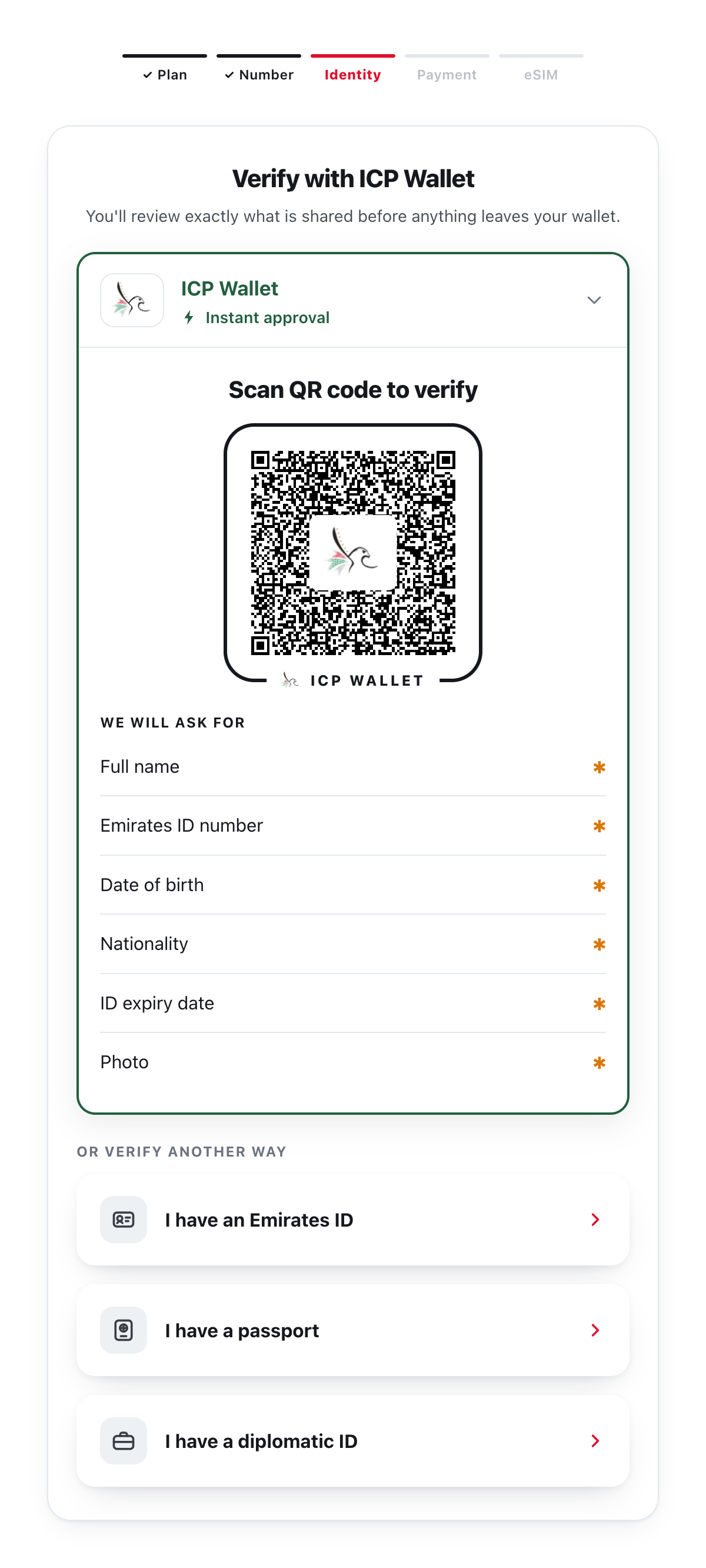
Hello Mobile: the identity step.
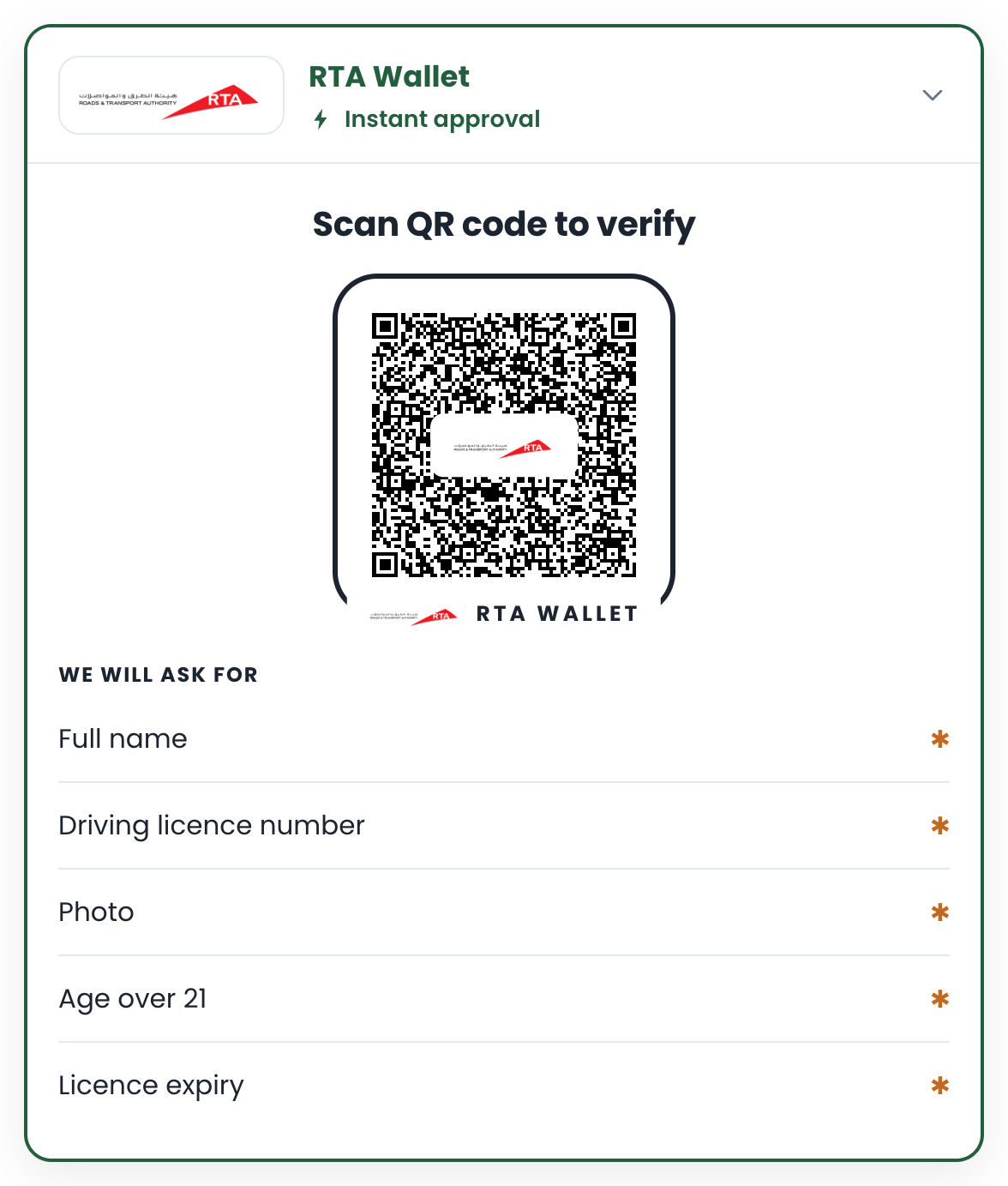
DriveNow: the licence step.

The Verify app: choose a check.
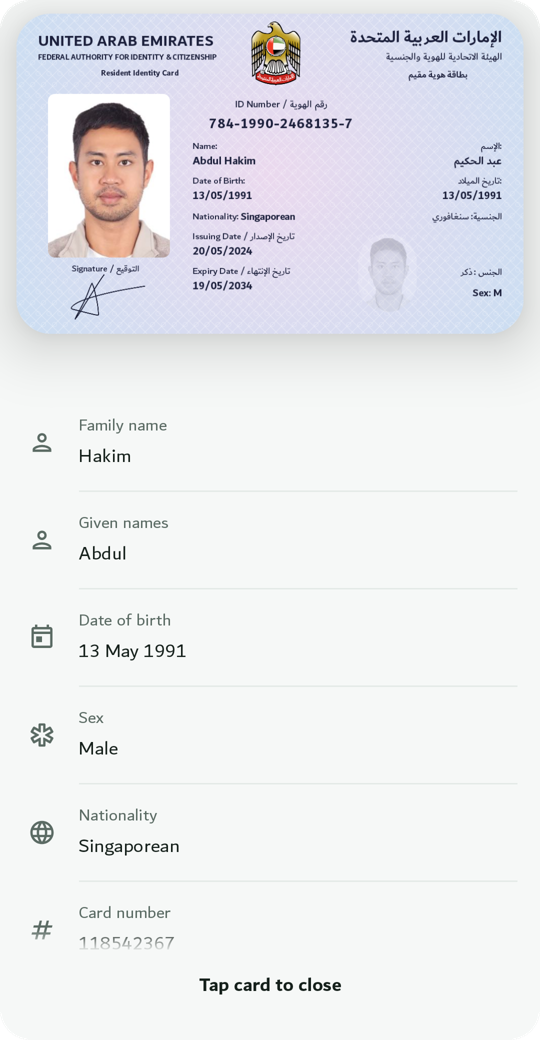
The Wallet app: a card and its fields.
## One trust bundle
[Section titled “One trust bundle”](#one-trust-bundle)
All four trust the same demo issuer through a signed issuer list, and the wallet trusts the demo verifiers (“DriveNow”, “Hello Mobile”, “Verify”, the Verify API) through a signed reader list. Demo data is fictional. See [Trust](/platform/trust/).
**Next:** [Try it in 5 minutes](/start/try-it/).
# Try it in 5 minutes
> Run a real verification between the demo wallet on your phone and a demo website.
The quickest way to understand the product is to watch a check happen. You need a phone with the demo wallet and a laptop (or the same phone) with a browser.
1. **Get the demo wallet.** Ask us for the Android build or the TestFlight link ([Support](/platform/support/)). On first launch it issues itself a demo driving licence and a demo Emirates ID with fictional data.
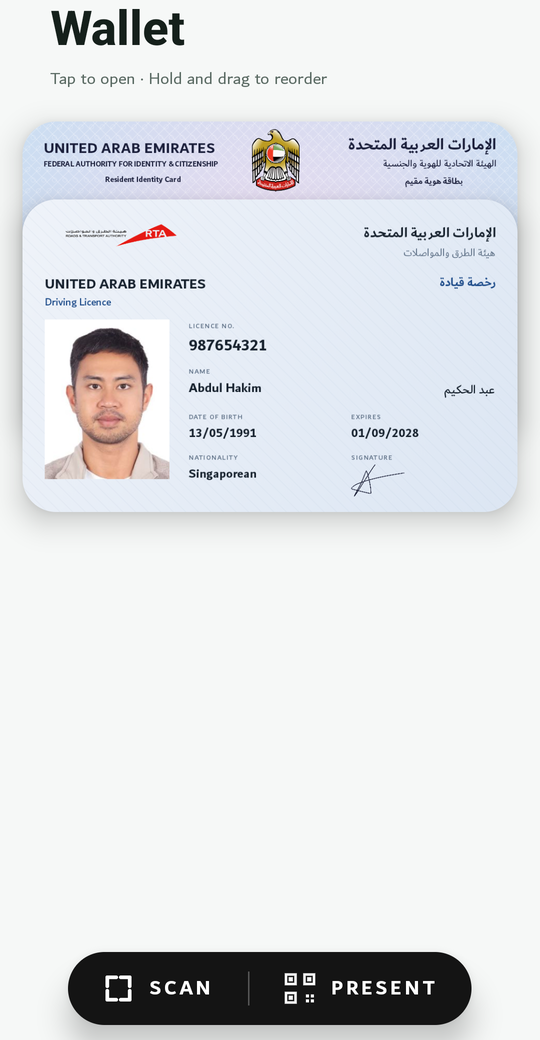
2. **Open the demo site.** Go to [icp-telco.abdulhakimsg.com](https://icp-telco.abdulhakimsg.com), a fictional mobile operator signing up a customer. Pick any plan and number. The identity step shows the ICP Wallet box.
3. **Scan or tap the QR code.** On a laptop, scan it with the wallet’s **Scan** button. On the phone, tap it.

4. **Approve on the phone.** The wallet names who is asking, shows exactly which fields they want, and waits for you to tap **Share**.

5. **Watch the site update.** The box turns into a green tick and lists the fields it received. The site’s server checked the issuer’s signature, the device binding and the validity before showing anything.
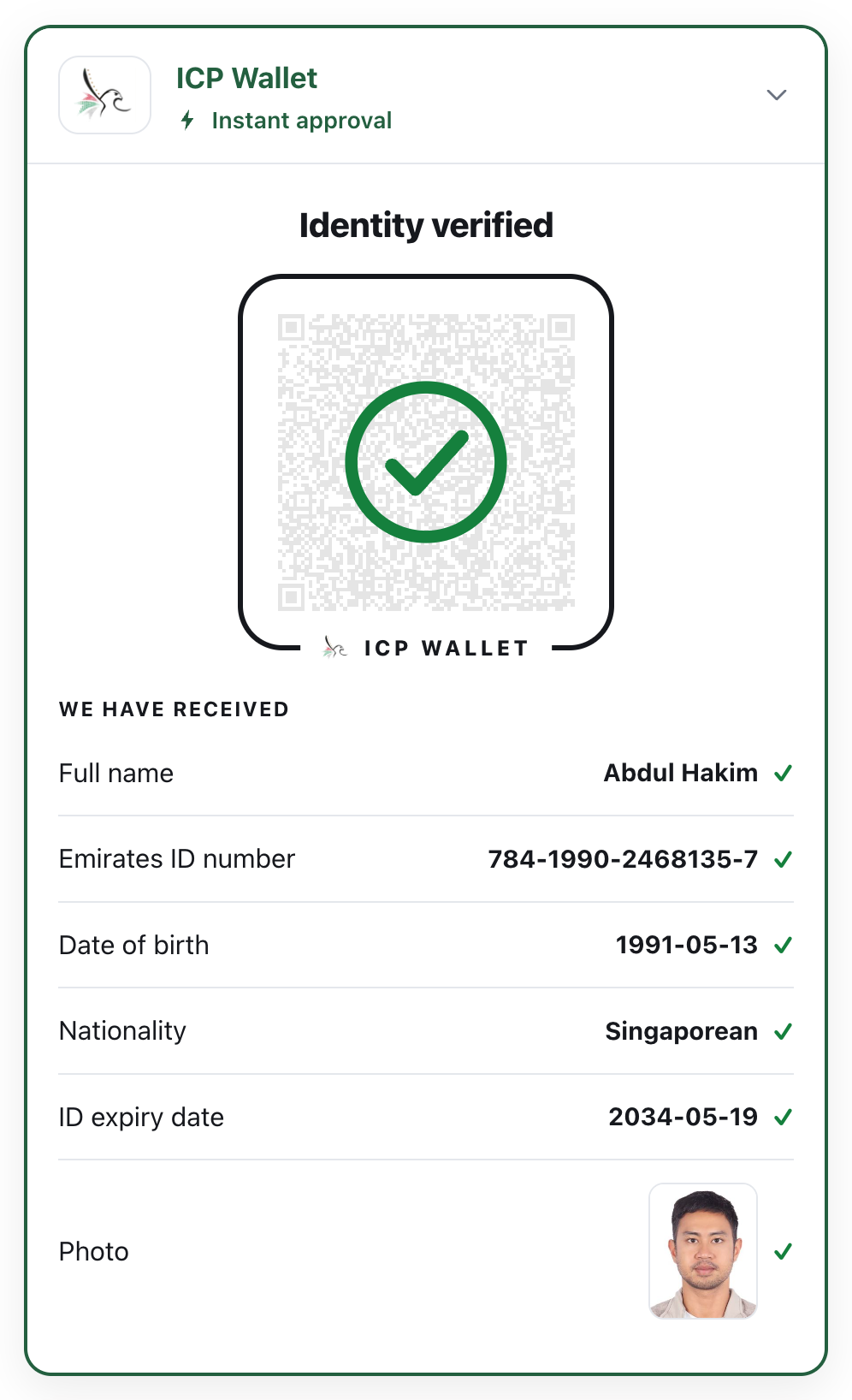
## What just happened
[Section titled “What just happened”](#what-just-happened)
* The website asked for seven fields of an Emirates ID, not the whole card.
* The wallet released only those fields, and only after you approved.
* The check ran on a server. The page never decides on its own.
* Wait a minute before scanning and the QR code expires; you get a **Refresh** button. An expired request can never be approved.
**Next:** build it yourself in [Build verification into your website](/web/quickstart/).
# Build a wallet app
> Hold verifiable credentials in your own Android or iOS app with ready-made screens, and present them in person or to websites.
The Wallet SDK gives your app everything a holder needs: receive credentials from an issuer, keep them behind the phone’s secure hardware, show them, and present them when asked. Ready-made screens cover the card list, the details, presenting over QR + Bluetooth, and scanning credential offers.

The card list. Cards are drawn from the signed data.

A card and its fields.
## How it works
[Section titled “How it works”](#how-it-works)
```
sequenceDiagram
autonumber
participant I as Issuer
participant A as Your wallet app
actor H as Holder
participant V as Verifier (site or app)
I->>A: Credential offer (QR or link)
A->>H: Preview of the offer
H->>A: Confirms: new key in secure hardware
I->>A: Credential, signed by the issuer, bound to that key
V->>A: Request: document + fields (QR, link, or system sheet)
A->>H: Names the verifier, lists the fields
H->>A: Approves
A->>V: Approved fields, signed with the device key
```
## What you get
[Section titled “What you get”](#what-you-get)
* **One SDK object** with the holder API: list, details, issue, present.
* **The wallet screen** (`WalletScreen` on Android, `WalletViewController` on iOS): the whole wallet UI, with permissions handled.
* **Card designs per document type**: the wallet draws each card from the signed data.
* **Entry points** websites and issuers use: deep links, App Links and Universal Links, the browser’s Digital Credentials API (Safari’s “share your ID” sheet on iOS 26, Chrome on Android).
## Worked example
[Section titled “Worked example”](#worked-example)
The **Wallet app** is the demo: Android and iOS, three document types with card designs, every entry point wired. The [Quickstart](/wallet/quickstart/) builds a holder app from the same pieces.
**Next:** [Quickstart](/wallet/quickstart/).
# Hold and show credentials
> Receive a credential from an issuer, list what the wallet holds, and show one credential's fields, with the API behind WalletScreen.
The wallet screen does all of this. If you build your own screens, the holder API is `sdk.wallet`:
* Android (Kotlin)
HolderApi.kt
```kotlin
package samples
import com.wallet.WalletSdk
import com.wallet.model.PresentmentState
import com.wallet.model.SdkResult
import kotlinx.coroutines.flow.collect
/** The holder API behind `WalletScreen`, for apps that build their own screens. */
class HolderApi(private val sdk: WalletSdk, private val ui: Ui) {
interface Ui {
fun showCards(lines: List)
fun showQr(payload: String)
fun askConsent(readerName: String?, requested: Any, onAnswer: (Boolean) -> Unit)
fun showError(message: String?)
fun done()
}
/** List what the wallet holds; the flow updates as credentials come and go. */
suspend fun listCredentials() {
sdk.wallet.credentials().collect { list ->
ui.showCards(list.map { "${it.displayName} ${it.docType} valid until ${it.validUntil}" })
}
}
/** One credential with its portrait and every field, labelled. */
suspend fun details(credentialId: String) {
val detail = sdk.wallet.details(credentialId)
detail?.claims?.forEach { println("${it.label}: ${it.value}") }
}
/** Receive a credential from an issuer's offer (a scanned QR or a link). */
suspend fun issue(offerUri: String) {
when (val preview = sdk.wallet.previewOffer(offerUri)) { // read-only, nothing redeemed yet
is SdkResult.Success -> println("Offer from ${preview.value.issuerName}: ${preview.value.credentialName}")
is SdkResult.Failure -> return ui.showError(preview.error.message)
}
when (val issued = sdk.wallet.issueFromOffer(offerUri)) { // after the holder confirms
is SdkResult.Success -> println("Issued ${issued.value.displayName}")
is SdkResult.Failure -> ui.showError(issued.error.message)
}
}
/** Present in person: show the QR, let the verifier connect, release only the approved fields. */
suspend fun present(credentialId: String? = null) {
val session = sdk.wallet.startPresentment(credentialId)
session.state.collect { state ->
when (state) {
is PresentmentState.Engaging -> state.qrPayload?.let(ui::showQr) // the verifier scans this
is PresentmentState.Consent -> ui.askConsent(state.readerName, state.requested) { approved ->
if (approved) session.approve(state.requested) else session.cancel()
}
is PresentmentState.Completed -> ui.done()
is PresentmentState.Failed -> ui.showError(state.error.message)
else -> {}
}
}
}
}
```
* iOS (Swift)
HolderApi.swift
```swift
import Wallet
/// What your own screens do; the samples leave it to you.
protocol HolderUi {
func showCards(_ lines: [String])
func showQr(_ payload: String)
func askConsent(readerName: String?, requested: Set, onAnswer: @escaping (Bool) -> Void)
func showError(_ message: String?)
func done()
}
/// The holder API behind the wallet screen, for apps that build their own screens.
final class HolderApi {
private let sdk: WalletSdk
private let ui: HolderUi
init(sdk: WalletSdk, ui: HolderUi) { self.sdk = sdk; self.ui = ui }
/// List what the wallet holds; the flow updates as credentials come and go.
func listCredentials() async throws {
try await sdk.wallet.credentials().collect(collector: Collector<[CredentialSummary]> { list in
self.ui.showCards(list.map { "\($0.displayName) \($0.docType) valid until \($0.validUntil ?? 0)" })
})
}
/// One credential with its portrait and every field, labelled.
func details(credentialId: String) async throws {
let detail = try await sdk.wallet.details(credentialId: credentialId)
detail?.claims.forEach { print("\($0.label): \($0.value)") }
}
/// Receive a credential from an issuer's offer (a scanned QR or a link).
func issue(offerUri: String) async throws {
let preview = try await sdk.wallet.previewOffer(offerUri: offerUri) // read-only, nothing redeemed yet
if let failed = preview as? SdkResultFailure { return ui.showError(failed.error.message) }
if let ok = preview as? SdkResultSuccess, let offer = ok.value {
print("Offer from \(offer.issuerName): \(offer.credentialName)")
}
let issued = try await sdk.wallet.issueFromOffer(offerUri: offerUri) // after the holder confirms
if let ok = issued as? SdkResultSuccess, let credential = ok.value {
print("Issued \(credential.displayName)")
} else if let failed = issued as? SdkResultFailure {
ui.showError(failed.error.message)
}
}
/// Present in person: show the QR, let the verifier connect, release only the approved fields.
func present(credentialId: String? = nil) async throws {
let session = sdk.wallet.startPresentment(credentialId: credentialId)
try await session.state.collect(collector: Collector { state in
switch state {
case let s as PresentmentStateEngaging:
if let qr = s.qrPayload { self.ui.showQr(qr) } // the verifier scans this
case let s as PresentmentStateConsent:
self.ui.askConsent(readerName: s.readerName, requested: s.requested) { approved in
if approved { session.approve(disclosedAttributes: s.requested) } else { session.cancel() }
}
case is PresentmentStateCompleted: self.ui.done()
case let s as PresentmentStateFailed: self.ui.showError(s.error.message)
default: break
}
})
}
}
```
Kotlin flows and results arrive as Kotlin types: `Collector` (in the same sample folder) collects a flow, and a result is `SdkResultSuccess` or `SdkResultFailure`.
## Receiving a credential
[Section titled “Receiving a credential”](#receiving-a-credential)
Issuers hand out **credential offers**: a QR code or a link (`openid-credential-offer://…`). The wallet previews the offer (issuer name, credential name), the holder confirms, and the credential is issued straight into the wallet, bound to a new key in the phone’s secure hardware. The wallet screen includes the scanner and the confirmation sheet.
* The wallet speaks **OpenID for Verifiable Credential Issuance** (pre-authorised code flow). Any conforming issuer works; the demo’s competition licence comes from a real issuing platform.
* Some issuers accept only Bearer tokens instead of DPoP-bound ones; `DpopPolicy.ALLOW_BEARER_FALLBACK` (the default) handles that per issuer.
## Showing credentials
[Section titled “Showing credentials”](#showing-credentials)
Fields are labelled and formatted from the document type: dates as dates, booleans as Yes / No, the ISO sex code as Male / Female, the portrait as an image. Each document type has a card design drawn from the signed data; the drawn card is what the wallet, the consent sheet and the iOS Digital Credentials sheet show.

Drawn by the wallet from the signed data. Demo data is fictional.
**Next:** [Present](/wallet/present/).
# Go live
> What to have in place before real holders keep real credentials in your app.
## Before launch
[Section titled “Before launch”](#before-launch)
* [ ] **Hardware keys.** `secureArea = HARDWARE` in production; `SOFTWARE` is for emulators and tests.
* [ ] **Reader trust.** A signed reader list (RICAL) or reader root certificates, so the consent sheet names verifiers. Unknown verifiers are shown as unknown; the holder can still decline.
* [ ] **Issuer configuration** for the real authority’s OpenID4VCI endpoint.
* [ ] **Entry points** registered and agreed with the sites you work with: App Link hosts, your Universal Link domain and its association file, the iOS provider extension ([Present](/wallet/present/)).
* [ ] **Card designs** for every document type you hold; others fall back to the neutral card.
* [ ] **Face check** ([Prove it’s you](/wallet/prove-its-you/)) for the credential types that need it: the model file shipped with the app, `NSCameraUsageDescription` on iOS (plus `FaceCheckHostViewController()` if you built your own screens), the threshold tried with real holders.
* [ ] **Store listing.** Android: package name and signing certificate fingerprint go into every site’s `assetlinks.json`. iOS: bundle id and team go into every site’s association file.
* [ ] **Test** issuance, in-person presentation to the Verify app, a website link on the same phone, and the system ID sheet.
## After launch
[Section titled “After launch”](#after-launch)
* A new signing certificate or bundle id breaks every App Link and Universal Link; plan rotations with the sites.
* Keep the SDK version aligned with the verifiers you work with when you update.
**Next:** [Credentials](/platform/credentials/) for the document types, and [Trust](/platform/trust/).
# Work offline
> What a wallet app does without a network (hold, show, present in person, the face check) and what needs one (receiving credentials, sharing with websites, status refresh).
A wallet built with the SDK keeps working in a car park, on a plane or at a remote checkpoint. The credentials live on the phone, the answer is signed on the phone, and in person the two phones talk over Bluetooth. Only a few things reach out to a server.
```
sequenceDiagram
autonumber
actor H as Holder
participant W as Wallet (your app)
participant V as Verifier app
actor O as Operator
Note over W,V: No network on either phone
O->>V: Picks a check
H->>W: Present: QR code
V->>W: Scans the QR, then connects over Bluetooth
V->>W: Signed request
W->>H: Names the verifier, lists the fields
H->>W: Share (and the face check, for protected credentials)
W->>V: Approved fields, signed with the phone's key
V-->>O: Result, checked on the verifier's phone
```
## What works without a network
[Section titled “What works without a network”](#what-works-without-a-network)
| Task | Offline? | Why |
| --------------------------------------------------------- | -------- | ---------------------------------------------------------------------------------------------------------------------------------------- |
| Show the card list and a card’s details | yes | the credentials are stored on the phone |
| Present in person (QR + Bluetooth) | yes | the phones connect directly; the answer is signed with a key in the phone’s secure hardware |
| Name the verifier on the consent sheet | yes | the list of trusted verifiers ships with your app (`TrustedVerifiers`) |
| The face check ([Prove it’s you](/wallet/prove-its-you/)) | yes | the face match with the ID photo runs only on the phone, on a FaceNet model ([how it works](/wallet/prove-its-you/#how-the-match-works)) |
| Receive a credential from an issuer | no | the credential is fetched from the issuer (OpenID4VCI) |
| Share with a website (link, QR or the phone’s ID sheet) | no | the website’s request and the answer travel over the internet |
| Refresh a credential’s status or renew it | no | the wallet contacts the issuer; it does so on its own when it next has a network |
## In your app
[Section titled “In your app”](#in-your-app)
Nothing to configure: in person, the SDK never needs a network. Two things are worth doing:
* **Let the holder know.** The ready-made wallet screen shows **Online** or **Offline** at the top, so the holder knows a website share will wait for a network.
* **Keep the trusted verifiers current.** The signed verifier list is part of your app. Ship an updated list with app updates, or download a newer one when the phone is online; nothing is fetched while presenting.
The verifier side works offline too, with one policy decision about revocation: [Build a verifier app → Work offline](/in-person/offline/).
**Next:** [Go live](/wallet/go-live/).
# Present
> In person over QR + Bluetooth, and to websites by link, QR or the phone's own ID sheet.
## In person
[Section titled “In person”](#in-person)
The wallet screen’s **Present** button does this end to end: a QR code (the *engagement*), the verifier scans it, the phones connect over Bluetooth, a consent sheet names the verifier and lists the fields, Share or Cancel. Only the approved fields leave the phone. The same flow on its own is `WalletPresentScreen` (Android) or `WalletPresentViewController` (iOS). With the API:
* Android (Kotlin)
HolderApi.kt
```kotlin
package samples
import com.wallet.WalletSdk
import com.wallet.model.PresentmentState
import com.wallet.model.SdkResult
import kotlinx.coroutines.flow.collect
/** The holder API behind `WalletScreen`, for apps that build their own screens. */
class HolderApi(private val sdk: WalletSdk, private val ui: Ui) {
interface Ui {
fun showCards(lines: List)
fun showQr(payload: String)
fun askConsent(readerName: String?, requested: Any, onAnswer: (Boolean) -> Unit)
fun showError(message: String?)
fun done()
}
/** List what the wallet holds; the flow updates as credentials come and go. */
suspend fun listCredentials() {
sdk.wallet.credentials().collect { list ->
ui.showCards(list.map { "${it.displayName} ${it.docType} valid until ${it.validUntil}" })
}
}
/** One credential with its portrait and every field, labelled. */
suspend fun details(credentialId: String) {
val detail = sdk.wallet.details(credentialId)
detail?.claims?.forEach { println("${it.label}: ${it.value}") }
}
/** Receive a credential from an issuer's offer (a scanned QR or a link). */
suspend fun issue(offerUri: String) {
when (val preview = sdk.wallet.previewOffer(offerUri)) { // read-only, nothing redeemed yet
is SdkResult.Success -> println("Offer from ${preview.value.issuerName}: ${preview.value.credentialName}")
is SdkResult.Failure -> return ui.showError(preview.error.message)
}
when (val issued = sdk.wallet.issueFromOffer(offerUri)) { // after the holder confirms
is SdkResult.Success -> println("Issued ${issued.value.displayName}")
is SdkResult.Failure -> ui.showError(issued.error.message)
}
}
/** Present in person: show the QR, let the verifier connect, release only the approved fields. */
suspend fun present(credentialId: String? = null) {
val session = sdk.wallet.startPresentment(credentialId)
session.state.collect { state ->
when (state) {
is PresentmentState.Engaging -> state.qrPayload?.let(ui::showQr) // the verifier scans this
is PresentmentState.Consent -> ui.askConsent(state.readerName, state.requested) { approved ->
if (approved) session.approve(state.requested) else session.cancel()
}
is PresentmentState.Completed -> ui.done()
is PresentmentState.Failed -> ui.showError(state.error.message)
else -> {}
}
}
}
}
```
* iOS (Swift)
HolderApi.swift
```swift
import Wallet
/// What your own screens do; the samples leave it to you.
protocol HolderUi {
func showCards(_ lines: [String])
func showQr(_ payload: String)
func askConsent(readerName: String?, requested: Set, onAnswer: @escaping (Bool) -> Void)
func showError(_ message: String?)
func done()
}
/// The holder API behind the wallet screen, for apps that build their own screens.
final class HolderApi {
private let sdk: WalletSdk
private let ui: HolderUi
init(sdk: WalletSdk, ui: HolderUi) { self.sdk = sdk; self.ui = ui }
/// List what the wallet holds; the flow updates as credentials come and go.
func listCredentials() async throws {
try await sdk.wallet.credentials().collect(collector: Collector<[CredentialSummary]> { list in
self.ui.showCards(list.map { "\($0.displayName) \($0.docType) valid until \($0.validUntil ?? 0)" })
})
}
/// One credential with its portrait and every field, labelled.
func details(credentialId: String) async throws {
let detail = try await sdk.wallet.details(credentialId: credentialId)
detail?.claims.forEach { print("\($0.label): \($0.value)") }
}
/// Receive a credential from an issuer's offer (a scanned QR or a link).
func issue(offerUri: String) async throws {
let preview = try await sdk.wallet.previewOffer(offerUri: offerUri) // read-only, nothing redeemed yet
if let failed = preview as? SdkResultFailure { return ui.showError(failed.error.message) }
if let ok = preview as? SdkResultSuccess, let offer = ok.value {
print("Offer from \(offer.issuerName): \(offer.credentialName)")
}
let issued = try await sdk.wallet.issueFromOffer(offerUri: offerUri) // after the holder confirms
if let ok = issued as? SdkResultSuccess, let credential = ok.value {
print("Issued \(credential.displayName)")
} else if let failed = issued as? SdkResultFailure {
ui.showError(failed.error.message)
}
}
/// Present in person: show the QR, let the verifier connect, release only the approved fields.
func present(credentialId: String? = nil) async throws {
let session = sdk.wallet.startPresentment(credentialId: credentialId)
try await session.state.collect(collector: Collector { state in
switch state {
case let s as PresentmentStateEngaging:
if let qr = s.qrPayload { self.ui.showQr(qr) } // the verifier scans this
case let s as PresentmentStateConsent:
self.ui.askConsent(readerName: s.readerName, requested: s.requested) { approved in
if approved { session.approve(disclosedAttributes: s.requested) } else { session.cancel() }
}
case is PresentmentStateCompleted: self.ui.done()
case let s as PresentmentStateFailed: self.ui.showError(s.error.message)
default: break
}
})
}
}
```
- One Bluetooth role per phone at a time: a wallet cannot present while it scans.
- Android wallets can offer the faster “central client” Bluetooth mode (`ProximityConfig`).
- Presenting over NFC is not available on iOS (Apple restricts it); QR + Bluetooth works on both.
- For credential types you protect, a face check runs after Share and before anything is sent ([Prove it’s you](/wallet/prove-its-you/)); the verifier waits a few seconds longer.
## To a website
[Section titled “To a website”](#to-a-website)
Websites that use the [box](/web/) reach a wallet three ways. The SDK handles the exchange once you register the entry points.
```
flowchart LR
S[Website] -- "openid4vp:// deep link" --> A[Your wallet app]
S -- "App Link / Universal Link (https)" --> A
S -- "Digital Credentials API" --> O[System ID sheet] --> A
A -- "signed answer" --> S
```
**Android** registers intent filters on the SDK’s activities:
```xml
```
**iOS** registers URL schemes, an Associated Domain, and (iOS 26) the Digital Credentials provider extension with an App Group:
```xml
CFBundleURLTypes
CFBundleURLSchemesopenid4vpmywallet
CFBundleURLSchemesopenid-credential-offer
```
```xml
com.apple.developer.associated-domains
applinks:wallet.example.com
com.apple.security.application-groups
group.com.example.wallet
```
Then forward the links that open the app to the wallet screen:
WalletApp.swift
```swift
import SwiftUI
import Wallet
/// The whole wallet UI: the card list, details, presenting, and scanning credential offers.
@main
struct WalletApp: App {
init() { WalletBranding.shared.appName = "My Wallet" } // the name on the consent sheet
var body: some Scene {
WindowGroup {
WalletScreen()
.ignoresSafeArea()
// Credential offers and website requests that open the app (URL schemes, Universal Links).
.onOpenURL { url in
_ = WalletViewControllersKt.handleWalletUrl(url: url.absoluteString, sameDevice: true)
}
}
}
}
/// The SDK's wallet screen, hosted in SwiftUI.
struct WalletScreen: UIViewControllerRepresentable {
func makeUIViewController(context: Context) -> UIViewController {
WalletViewControllersKt.WalletViewController(sdk: MyWallet.sdk)
}
func updateUIViewController(_ controller: UIViewController, context: Context) {}
}
```
Call `sdk.registerAsIosDcProvider(...)` once credentials exist, so Safari’s sheet lists your wallet. After sharing, the wallet can show its own “shared” confirmation and send the holder back to the site.
**Next:** [Go live](/wallet/go-live/).
# Prove it's you
> Before a protected credential leaves the phone, the holder looks into the camera, passes a short liveness step and is matched against the credential's own photo. Two lines of config.
Sharing a credential proves the phone holds it. For a credential like the Emirates ID you may also want proof that the person holding the phone is the person on it. The face check does that in about four seconds, on the phone, without sending any image anywhere.
```
sequenceDiagram
autonumber
actor H as Holder
participant W as Wallet (your app)
participant V as Verifier
V->>W: Request (in person, website or same device)
W->>H: Names the verifier, lists the fields
H->>W: Share
W->>H: Camera: "Put your face in the oval", then "Blink"
H->>W: Blinks
W->>W: Matches the live face with the credential's photo
W->>V: Signed answer (only after a match)
```
## What the holder sees
[Section titled “What the holder sees”](#what-the-holder-sees)
1. The consent sheet, as always. They tap **Share**.
2. The front camera opens over the same screen, dimmed except for an oval. One instruction at a time guides them in: **Put your face in the oval**, **Move closer**, **Centre your face**. The oval turns green when the face is placed, and a ring around it fills as each step passes.
3. One short challenge: **Blink** or **Smile**.
4. **Hold still**, then **Checking…**: the face is compared with the photo on the credential.
5. On a match a tick appears and sharing continues on its own. Otherwise: **Try again** with a short tip, and the camera comes back by itself. After the last try: **Not shared**.
Order on every path, in person or online: consent → face check → sign → send. If the check does not pass, nothing is signed; the verifier sees a cancelled exchange.
## Turn it on
[Section titled “Turn it on”](#turn-it-on)
The face check is optional. A wallet without it shares credentials on the holder’s consent alone, needs no camera permission for sharing, and doesn’t ship the model file. To add it:
* Android (Android Studio)
1. **Add the library.** In `app/build.gradle.kts`, next to the other Wallet SDK lines, add `implementation("com.wallet.sdk:sdk-face:")` and click **Sync Now**. It declares the camera permission itself.
2. **Add the model.** Copy `models/facenet_512.tflite` from the SDK zip into `app/src/main/assets/` (create the folder with **New → Folder → Assets Folder** if you don’t have one).
3. **Turn the check on** where you create the SDK: one `shareGuard` line.
ProveItsYou.kt
```kotlin
package samples
import android.content.Context
import com.wallet.Wallet
import com.wallet.WalletSdk
import com.wallet.config.IssuerConfig
import com.wallet.config.TrustedVerifiers
import com.wallet.face.FaceCheckPolicy
import com.wallet.face.FaceModel
import com.wallet.face.FaceShareGuard
import com.wallet.model.SdkResult
/** Before the Emirates ID is shared, the holder proves it's them: liveness + face match against the card's photo. */
object ProveItsYou {
fun create(context: Context, signedReaderList: ByteArray): WalletSdk {
// The face model from the SDK zip (models/facenet_512.tflite), copied into app/src/main/assets.
val model = FaceModel.fromBytes(context.assets.open(FaceModel.FILE_NAME).use { it.readBytes() })
return Wallet.createWallet(
issuer = IssuerConfig("https://issuer.example.com", "my-wallet", "mywallet://callback"),
trustedVerifiers = TrustedVerifiers(signedList = signedReaderList),
credentialTypes = listOf(EmiratesIdType.type),
// The only line that turns the check on. Other credential types are shared as before.
shareGuard = FaceShareGuard(FaceCheckPolicy(docTypes = setOf(EmiratesIdType.type.docType)), model),
)
}
/** Optional. Right after the credential arrives: can its photo be used? Warn the holder early if not. */
suspend fun checkPhoto(sdk: WalletSdk, credentialId: String): String? =
when (val r = sdk.wallet.prepareForSharing(credentialId)) {
is SdkResult.Success -> null
is SdkResult.Failure -> r.error.message // e.g. "The photo on this credential can't be used for a face check"
}
}
```
4. **Run it on a phone** (the check needs a front camera) and share the Emirates ID: the camera opens over the consent sheet. Nothing else to host; the check attaches itself to whatever screen is presenting.
* iOS (Xcode)
1. **Use the face variant of the framework.** It is the same `Wallet` framework plus the face check, and needs Google ML Kit and TensorFlow Lite, which ship only as CocoaPods. Remove the plain `Wallet.xcframework` from the target, then add a `Podfile` next to your `.xcodeproj`:
```ruby
platform :ios, '16.0'
target 'YourApp' do
use_frameworks!
pod 'WalletFace', :path => 'vendor/wallet-sdk/ios/face'
end
```
Run `pod install` in Terminal and from now on open the **`.xcworkspace`**, not the `.xcodeproj`.
2. **Add the model.** Drag `models/facenet_512.tflite` from the SDK zip into the project navigator; tick **Copy items if needed** and your app target.
3. **Explain the camera.** In the target’s **Info** tab, set `NSCameraUsageDescription`, e.g. “Confirm it’s you before sharing your ID.”
4. **Turn the check on** where you create the SDK:
```swift
let path = Bundle.main.path(forResource: "facenet_512", ofType: "tflite")!
let model = FaceModel.companion.fromFile(path: path)
let sdk = Wallet.shared.createWallet(
issuer: IssuerConfig(baseUrl: "https://issuer.example.com", clientId: "my-wallet",
redirectUri: "mywallet://callback", dpopPolicy: .allowBearerFallback),
trustedVerifiers: TrustedVerifiers(signedList: signedReaderList),
credentialTypes: [EmiratesIdType.type],
// The only line that turns the check on. Other credential types are shared as before.
shareGuard: FaceShareGuard(
policy: FaceCheckPolicy(docTypes: ["org.iso.23220.photoid.1"], liveness: .quick,
similarityThreshold: 0.7, maxAttempts: 3),
model: model)
)
```
5. **Run it on an iPhone** (the check needs a front camera; there is no simulator build). The ready-made wallet screen (`WalletViewControllersKt.WalletViewController(sdk:)`) shows the check by itself. If you build your own SwiftUI screens instead, present `FaceCheckHostViewController()` once over your root view.
## How the match works
[Section titled “How the match works”](#how-the-match-works)
The check uses **FaceNet**, the face-recognition method published by Google researchers:
> Florian Schroff, Dmitry Kalenichenko, James Philbin. *FaceNet: A Unified Embedding for Face Recognition and Clustering.* IEEE Conference on Computer Vision and Pattern Recognition (CVPR), 2015. [arXiv:1503.03832](https://arxiv.org/abs/1503.03832)
FaceNet turns a face into a short list of numbers, an *embedding*, trained so that two photos of the same person land close together and photos of different people land far apart. In the paper it reached 99.63% accuracy on the standard Labeled Faces in the Wild benchmark.
On the phone, in three steps:
1. **Find the face.** A face detector locates the face and the eyes, in the camera image and in the credential’s photo.
2. **Turn each face into numbers.** Each face is levelled, cropped, scaled to 160 × 160 pixels and run through the model, which returns 512 numbers.
3. **Compare.** The two lists are compared by cosine similarity, a score from 0 to 1. After the liveness step, up to four frames with a neutral expression are compared, a moment apart, and the best score counts; one blurred or blinking frame doesn’t fail the check. At or above the threshold (0.7 by default), it’s a match.
The model is a FaceNet-style network (Inception-ResNet-v1) in TensorFlow Lite format. It is an openly licensed reimplementation of the paper, not Google’s original model, so the paper’s figure describes the method rather than this file. Measure it on your own users’ photos before you choose a threshold.
## The model file
[Section titled “The model file”](#the-model-file)
The model is `facenet_512.tflite`, about 23 MB. It takes a 160 × 160 colour image and returns 512 numbers. It is in the SDK zip under `models/`, not inside any library, so your app decides how to ship it: bundled as above, or downloaded on first run. Load it once with `FaceModel.fromBytes` or `FaceModel.fromFile`. Everything runs on the phone’s own processor through TensorFlow Lite. No server or internet connection is involved, so the check works offline.
## Settings
[Section titled “Settings”](#settings)
| `FaceCheckPolicy` | Meaning | Default |
| --------------------- | ------------------------------------------------------------------------------------------------------------------------------------------------------ | -------- |
| `docTypes` | which credential types are protected; every other type is shared as before | required |
| `liveness` | `NONE` (match only, about 1 s; a printed photo would pass), `QUICK` (blink or smile), `STRICT` (both), `FULL` (the complete selfie ritual, 20 to 40 s) | `QUICK` |
| `similarityThreshold` | the match score a live face must reach, 0 to 1 | `0.7` |
| `maxAttempts` | retries before the share is refused | `3` |
Lower the threshold a little if genuine holders with a changed look (a new beard, glasses) are refused; raise it where a false match costs more than a retry.
## Check early (optional)
[Section titled “Check early (optional)”](#check-early-optional)
Call `sdk.wallet.prepareForSharing(credentialId)` right after a protected credential arrives. It fails with `FACE_CHECK_UNAVAILABLE` when the credential’s photo has no usable face, so you can warn the holder before they are standing at a counter.
If you skip it, nothing else changes: a credential whose photo can’t be used is refused when the holder tries to share it, with the message “The photo on this credential can’t be used for a face check”.
## Turn it off
[Section titled “Turn it off”](#turn-it-off)
Remove the `shareGuard` argument (and the line that loads the model). Every credential is then shared on consent alone. You can also remove the face library (`sdk-face` on Android, the face variant of the framework on iOS) and the model file, which makes the app about 23 MB smaller.
## What is stored
[Section titled “What is stored”](#what-is-stored)
Nothing. The credential’s photo is turned into numbers in memory for the comparison and discarded with the process; camera frames are never written or sent. The verifier receives the same fields it would have without the check.
## Android and iOS
[Section titled “Android and iOS”](#android-and-ios)
| | Android | iOS |
| ----------------------------- | --------------------------------------------- | ------------------------------------------------------------------------------------------------------- |
| Library | `com.wallet.sdk:sdk-face` | the face variant of `Wallet.xcframework` (`ios/face/`), via CocoaPods |
| Extra requirements | `CAMERA` permission (declared by the library) | `NSCameraUsageDescription`, iOS 16, a Podfile (Google ML Kit and TensorFlow Lite have no Swift Package) |
| Hosting | automatic | automatic in the ready-made screens; `FaceCheckHostViewController()` over your own |
| iOS Digital Credentials sheet | n/a | not offered for protected types: an extension has no camera |
**Next:** [Go live](/wallet/go-live/).
# Quickstart
> Create the SDK object for a holder, show the wallet screen, and describe your document types.
**You need** Android Studio or Xcode, the SDK zip, and a phone to run your app on. About an hour.
1. **Add the SDK** to your project: in Android Studio, the Maven folder and the two libraries; in Xcode, `Wallet.xcframework` (Embed & Sign), `-lsqlite3` and the `compose-resources` folder. Step by step: [Install & versions](/platform/install/).
2. **Create the SDK object once** for the process: where credentials come from, and which verifiers to name as trusted.
* Android (Kotlin)
WalletSetup.kt
```kotlin
package samples
import com.wallet.Wallet
import com.wallet.WalletSdk
import com.wallet.config.IssuerConfig
import com.wallet.config.TrustedVerifiers
/** The SDK object for a wallet app. Create it once, when the app starts, and keep it. */
object WalletSetup {
fun create(signedReaderList: ByteArray): WalletSdk = Wallet.createWallet(
// Where credentials come from: your OpenID4VCI issuer.
issuer = IssuerConfig(
baseUrl = "https://issuer.example.com",
clientId = "my-wallet",
redirectUri = "mywallet://callback",
),
// The verifiers named on the consent sheet ("Verify is asking for…"); others show as unknown.
trustedVerifiers = TrustedVerifiers(signedList = signedReaderList),
// Document types you hold besides the built-in driving licence.
credentialTypes = listOf(EmiratesIdType.type),
// A check before sharing, e.g. the face check (see Prove it's you). Null: share on consent.
shareGuard = null,
)
}
/** Shared by the samples: the one SDK instance of the app. */
object App {
lateinit var sdk: WalletSdk
}
```
* iOS (Swift)
WalletSetup.swift
```swift
import Wallet
/// The SDK object for a wallet app. Created once, when the app starts, and kept.
enum WalletSetup {
static func create(signedReaderList: KotlinByteArray) -> WalletSdk {
Wallet.shared.createWallet(
// Where credentials come from: your OpenID4VCI issuer.
issuer: IssuerConfig(
baseUrl: "https://issuer.example.com",
clientId: "my-wallet",
redirectUri: "mywallet://callback",
dpopPolicy: .allowBearerFallback
),
// The verifiers named on the consent sheet ("Verify is asking for…"); others show as unknown.
trustedVerifiers: TrustedVerifiers(signedList: signedReaderList),
// Document types you hold besides the built-in driving licence.
credentialTypes: [EmiratesIdType.type],
// A check before sharing, e.g. the face check (see Prove it's you). nil: share on consent.
shareGuard: nil
)
}
}
/// Shared by the samples: the one SDK instance of the app.
enum MyWallet {
static let sdk = WalletSetup.create(signedReaderList: KotlinByteArray(size: 0)) // your signed reader list
}
```
Every credential’s key is kept in the phone’s secure hardware (the Android Keystore or the Secure Enclave).
3. **Show the wallet screen.** It is the whole holder UI: cards, details, presenting, scanning offers, permissions.
* Android (Kotlin)
WalletActivity.kt
```kotlin
package samples
import android.os.Bundle
import androidx.activity.compose.setContent
import androidx.compose.material3.MaterialTheme
import androidx.fragment.app.FragmentActivity
import com.wallet.ui.WalletBranding
import com.wallet.ui.WalletScreen
/** The whole wallet UI: the card list, details, presenting, and scanning credential offers. */
class WalletActivity : FragmentActivity() {
override fun onCreate(savedInstanceState: Bundle?) {
super.onCreate(savedInstanceState)
setContent {
MaterialTheme(typography = WalletBranding.typography) {
WalletScreen(App.sdk)
}
}
}
}
```
Host it in a `FragmentActivity`.
* iOS (Swift)
WalletApp.swift
```swift
import SwiftUI
import Wallet
/// The whole wallet UI: the card list, details, presenting, and scanning credential offers.
@main
struct WalletApp: App {
init() { WalletBranding.shared.appName = "My Wallet" } // the name on the consent sheet
var body: some Scene {
WindowGroup {
WalletScreen()
.ignoresSafeArea()
// Credential offers and website requests that open the app (URL schemes, Universal Links).
.onOpenURL { url in
_ = WalletViewControllersKt.handleWalletUrl(url: url.absoluteString, sameDevice: true)
}
}
}
}
/// The SDK's wallet screen, hosted in SwiftUI.
struct WalletScreen: UIViewControllerRepresentable {
func makeUIViewController(context: Context) -> UIViewController {
WalletViewControllersKt.WalletViewController(sdk: MyWallet.sdk)
}
func updateUIViewController(_ controller: UIViewController, context: Context) {}
}
```
The screen is a `UIViewController`; in SwiftUI, wrap it in a `UIViewControllerRepresentable`. Pass the links that open your app to `handleWalletUrl`, so offers and website requests reach the wallet.
4. **Describe your document types.** The driving licence is built in. For anything else, a `CredentialType` gives every field a label, a format and an icon; the wallet, the consent sheet and a verifier’s result screen all use it.
* Android (Kotlin)
EmiratesIdType.kt
```kotlin
package samples
import com.wallet.model.AttributeKind
import com.wallet.model.CredentialAttribute
import com.wallet.model.CredentialNamespace
import com.wallet.model.CredentialType
/** A document type: labels, formats and icons for every field. The wallet and the verifier both use it. */
object EmiratesIdType {
val type = CredentialType(
docType = "org.iso.23220.photoid.1",
displayName = "Emirates ID",
namespaces = listOf(
CredentialNamespace(
"org.iso.23220.1",
listOf(
CredentialAttribute("family_name", "Family name", AttributeKind.Text, mandatory = true, icon = "PERSON"),
CredentialAttribute("given_name", "Given names", AttributeKind.Text, mandatory = true, icon = "PERSON"),
CredentialAttribute("birth_date", "Date of birth", AttributeKind.Date, icon = "TODAY"),
CredentialAttribute("sex", "Sex", AttributeKind.Sex),
CredentialAttribute("portrait", "Photo", AttributeKind.Picture, icon = "ACCOUNT_BOX"),
CredentialAttribute("expiry_date", "Expiry date", AttributeKind.Date, icon = "EVENT"),
),
),
CredentialNamespace(
"org.iso.23220.photoid.1",
listOf(CredentialAttribute("person_id", "ID number", AttributeKind.Text, mandatory = true, icon = "BADGE")),
),
),
)
}
```
* iOS (Swift)
EmiratesIdType.swift
```swift
import Wallet
/// A document type: labels, formats and icons for every field. The wallet and the verifier both use it.
enum EmiratesIdType {
static let type = CredentialType(
docType: "org.iso.23220.photoid.1",
displayName: "Emirates ID",
namespaces: [
CredentialNamespace(id: "org.iso.23220.1", attributes: [
attribute("family_name", "Family name", .text, mandatory: true, icon: "PERSON"),
attribute("given_name", "Given names", .text, mandatory: true, icon: "PERSON"),
attribute("birth_date", "Date of birth", .date, icon: "TODAY"),
attribute("sex", "Sex", .sex),
attribute("portrait", "Photo", .picture, icon: "ACCOUNT_BOX"),
attribute("expiry_date", "Expiry date", .date, icon: "EVENT"),
]),
CredentialNamespace(id: "org.iso.23220.photoid.1", attributes: [
attribute("person_id", "ID number", .text, mandatory: true, icon: "BADGE"),
]),
]
)
/// Swift sees every parameter of CredentialAttribute; this fills in the Kotlin defaults.
private static func attribute(_ id: String, _ label: String, _ kind: AttributeKind,
mandatory: Bool = false, icon: String? = nil) -> CredentialAttribute {
CredentialAttribute(id: id, label: label, kind: kind, description: label,
mandatory: mandatory, icon: icon, expiredBadge: nil)
}
}
```
Kinds: `Text`, `Date`, `DateTime`, `Picture`, `Boolean`, `Number`, `Sex`. Card designs are drawing functions per document type, supplied through a brand pack; document types without one get a neutral card.
5. **Run it on a phone** (Android Studio: **Run ▶**; Xcode: **⌘R**): Bluetooth and the camera don’t work in emulators or simulators. Scan a credential offer from your issuer to receive a credential, then present it to the Verify app on a second phone, and open a Hello Mobile link on the same phone.
**Next:** [Hold and show credentials](/wallet/credentials/).
# Build verification into your website
> Add one element to a page; the Verify API checks the ID; your server reads the result.
You add one element to a page. It shows the wallet’s QR code (tappable on a phone), lists the fields you will ask for, and turns into a green tick with the received fields once the customer approves. The checking never runs in the browser: it runs on the **Verify API**, and your server reads the outcome from there with a secret key.

The box on Hello Mobile’s identity step. Same element on a laptop and on a phone.
## How it works
[Section titled “How it works”](#how-it-works)
```
sequenceDiagram
autonumber
actor C as Customer
participant B as Browser (the box)
participant A as Verify API
participant W as Wallet
participant S as Your server
B->>A: POST /new
A-->>B: session id, QR / deep link
C->>W: Scans or taps the QR
W->>A: GET /request/:id (signed request)
W->>C: Names the site, lists the fields
C->>W: Approves
W->>A: POST /response/:id
A->>A: Verify signature, device binding, validity
B->>A: GET /result/:id
A-->>B: verified: show the tick
B->>S: "session :id is verified"
S->>A: GET /v1/results/:id (secret key)
A-->>S: the result you act on
```
The browser shows a QR code and asks “is it done yet?”. Your server reads the outcome with the secret key and decides whether the customer continues.
## What you need
[Section titled “What you need”](#what-you-need)
| | |
| -------------------------- | ---------------------------------------------------------------------------------------------------------------------------------------------------------------------------------------- |
| The box | `npm install` of one package, `@wallet/verify` |
| A tenant on the Verify API | a **publishable key** for the page and a **secret key** for your server; we configure the name the wallet shows, the document and fields, the issuers you trust and your allowed origins |
| A phone with a wallet | the demo wallet for pilots; any standards-based wallet in production |
## Worked example
[Section titled “Worked example”](#worked-example)
**Hello Mobile** is the demo: a mobile operator’s signup that verifies an Emirates ID at the identity step. The [Quickstart](/web/quickstart/) rebuilds that step with Hello Mobile’s own code; the code is compiled and tested in the SDK repository, so it runs as shown.
**Next:** [Quickstart](/web/quickstart/).
# Verify API
> Endpoints, keys, the result shape and the rules of the hosted verifier.
Base URL: `https://hakim-verify-api.vercel.app`
## Keys
[Section titled “Keys”](#keys)
| Key | Where it goes | Allows |
| ------------------ | ------------------------------------ | ----------------------------------------------------- |
| Publishable `pk_…` | in the page, in the box’s `endpoint` | starting sessions and polling results for your tenant |
| Secret `sk_…` | your server only | reading and cancelling your tenant’s results |
## Endpoints
[Section titled “Endpoints”](#endpoints)
| Method and path | Caller | Purpose |
| ---------------------------- | ----------------------------------------- | -------------------------------------------------- |
| `POST /v1//new` | the box | start a session → `{ id, deepLink, expiresAt, … }` |
| `GET /v1//session/:id` | the box | hand-off details again; 410 once expired |
| `GET /v1//result/:id` | the box | current state |
| `POST /v1//close/:id` | wallet | the holder dismissed the request |
| `POST /v1//dcapi/:id` | the box | Digital Credentials API response |
| `GET /v1//request/:id` | wallet | the signed request |
| `POST /v1//response/:id` | wallet | the presentation |
| `GET /v1/results/:id` | your server, `Authorization: Bearer sk_…` | the outcome |
| `DELETE /v1/results/:id` | your server, `Authorization: Bearer sk_…` | cancel a session |
Page-facing routes answer CORS preflight for the origins on your tenant’s allowed list.
## Per tenant
[Section titled “Per tenant”](#per-tenant)
Configured per tenant: the name the wallet shows, the request (document and fields), the trusted issuers, allowed origins, the request validity window (ten minutes by default), the wallet hand-off settings, and optionally your own reader certificate. Results are stored per tenant; a secret key only reads its own.
## Result
[Section titled “Result”](#result)
```json
{ "state": "verified", "verified": true, "docType": "org.iso.23220.photoid.1", "trustedChain": true,
"claims": { "family_name": "…", "portrait": "data:image/jpeg;base64,…" }, "namespaces": { "…": {} } }
{ "state": "failed", "verified": false, "error": "…" }
{ "state": "waiting" } // also: cancelled, expired
```
## Rules
[Section titled “Rules”](#rules)
* An expired session can never be approved (410); unknown ids read as expired.
* A second submission returns the first outcome.
* A late `close` never overrides a result.
Every `state` and `error` value is listed in [Errors and states](/platform/errors/).
# The element
> Every attribute, event, method and CSS variable of the verification box.
```js
import '@wallet/verify' // registers
```
```ts
import type { WalletVerifyElement, VerifyResult } from '@wallet/verify'
```
## Attributes
[Section titled “Attributes”](#attributes)
| Attribute | Default | Meaning |
| --------------------------------------------------------------- | ------------------------------------- | --------------------------------------------------------------------------------------------------------------------------------------------------------------- |
| `endpoint` | | your tenant URL: `https://hakim-verify-api.vercel.app/v1/` |
| `wallet-name` | `Digital wallet` | shown in the header, the QR centre and the tag under the QR |
| `wallet-logo` | | image URL for the same places; a square mark works best |
| `fields` | | comma-separated labels for “We will ask for”; add `=claim` or `=a+b` to show values once verified |
| `session-id` | | adopt an existing session instead of starting a new one (a reloaded page keeps its QR) |
| `tagline` | `Instant approval` | header subtitle |
| `heading`, `heading-tap`, `heading-verified`, `heading-expired` | | copy above the QR: desktop, phone, done, expired |
| `ask-heading`, `received-heading` | `We will ask for`, `We have received` | list titles |
| `reload-label` | `Reload QR` | the button on a dimmed QR |
| `link-host` | | iOS Universal Link host of the wallet (`https:///open`) |
| `ios-scheme` | | the wallet’s private iOS URL scheme, used when no Universal Link applies |
| `app-link` | `true` | Android: open an App Link on your own site instead of the wallet deep link; set `false` unless you serve the `/w/` route ([Same device](/web/same-device/)) |
| `dc-api` | off | also try the browser’s Digital Credentials API on tap |
| `expanded` | `true` | accordion state |
| `no-header` | off | hide the header row |
| `auto` | `true` | start a session as soon as the element is shown |
| `idle-timeout` | `15000` | ms before an untouched QR dims and offers Reload (`0` = never) |
| `fire-timeout` | `10000` | ms before an unanswered tap dims and offers Reload |
## Events
[Section titled “Events”](#events)
| Event | `detail` | When |
| ----------- | ------------------------------------------ | -------------------------------------------------------------------------------- |
| `session` | `{ id, deepLink, expiresAt, … }` | a session started (also after Reload; then `POST /new` carried `{ supersedes }`) |
| `verified` | the server result with `claims`, `docType` | the wallet’s answer verified |
| `failed` | `{ error }` | verification failed |
| `cancelled` | | the holder dismissed the request |
| `expired` | | the request expired |
| `toggle` | `{ expanded }` | the header was clicked |
All events bubble and cross the shadow boundary.
```js
const el = document.querySelector('wallet-verify')
el.addEventListener('session', (e) => saveSessionId(e.detail.id))
el.addEventListener('verified', (e) => confirmOnServer(e.detail))
```
## Methods and properties
[Section titled “Methods and properties”](#methods-and-properties)
`start()`, `reload()`, `cancel()`; `state` (`idle`, `loading`, `ready`, `waiting`, `cancelled`, `verified`, `failed`), `session`, `result`.
## Theming
[Section titled “Theming”](#theming)
CSS custom properties on the element: `--wallet-accent`, `--wallet-accent-tint`, `--wallet-ink`, `--wallet-muted`, `--wallet-line`, `--wallet-star`, `--wallet-spinner`, `--wallet-ok`, `--wallet-radius`, `--wallet-frame-size`. Fonts are inherited from the page. Parts for deeper styling: `card`, `header`, `icon`, `title`, `tagline`, `body`, `heading`, `frame`, `status`, `tag`, `note`, `ask`, `reload`, `spinner`.
```css
wallet-verify { --wallet-accent: #235f3f; --wallet-accent-tint: #e9f4ee; --wallet-star: #c2691f; }
wallet-verify::part(card) { box-shadow: none; }
```
## Behaviour
[Section titled “Behaviour”](#behaviour)
* Desktop: the QR is scan-only. Phone: tapping it opens the wallet (App Link, Universal Link, private scheme, or `openid4vp://`).
* Same device: if the tab regains focus while waiting with no result, the QR dims and offers Reload.
* Verified: the QR becomes a tick and the `fields` list shows the received values.
**Next:** the [Verify API](/web/api/).
# Go live
> What to have in place before real customers verify on your site.
## Before launch
[Section titled “Before launch”](#before-launch)
* [ ] **Domain and HTTPS.** The box must be served from a real domain over HTTPS.
* [ ] **Keys in the right places.** Publishable key on the page, secret key on the server only.
* [ ] **Your production origins** on the tenant’s allowed list. Send us the exact host names.
* [ ] **Production trust.** Ask us to switch your tenant from the demo issuer to the real authority’s certificate, and to register your reader certificate if you want the wallet to show your own name.
* [ ] **Server-side result check** on every step that depends on identity ([Quickstart, step 5](/web/quickstart/)).
* [ ] **Request only what you need.** Prefer `age_over_21` to a birth date; leave out the portrait unless staff compare faces. See [Security and privacy](/platform/security/).
* [ ] **Copy.** `fields` labels the customer understands; `wallet-name` and `wallet-logo` set to the wallet they have.
* [ ] **Test on a phone**, same device (tap) and cross device (scan from another phone).
## After launch
[Section titled “After launch”](#after-launch)
* Watch `failed` and `expired` rates: many `expired` means customers take longer than the request window (ask us to raise it); many `failed` usually means an untrusted issuer or an old wallet build. See [Errors and states](/platform/errors/).
* Install the new `.tgz` when an update arrives; the version is in the file name.
**Next:** the [element reference](/web/element/) and the [Verify API reference](/web/api/).
# Quickstart
> Put the box on a page, connect it to your tenant, and read the result on your server. About an hour.
This is Hello Mobile’s identity step, reduced to the parts you copy. Every code block is tested against the package before each release.
**You need** Node.js 20+, a web project (the samples are React, plain HTML works too), the SDK zip, your publishable and secret keys, and a phone with the demo wallet.
1. **Install the box.**
```bash
npm install ./vendor/wallet-verify-0.7.0.tgz
```
2. **Describe the fields once.** Labels are what the customer reads; claim names are what the wallet returns.
lib/claims.ts
```ts
// The fields the identity step asks for. Labels are what the customer reads; claim names are what the
// wallet returns. Shared by the page (for the box) and the server (for the result).
export const VERIFY_FIELDS = [
'Given names=given_name',
'Family name=family_name',
'Emirates ID number=person_id',
'Date of birth=birth_date',
'Nationality=nationality',
'ID expiry date=expiry_date',
'Photo=portrait',
].join(', ')
```
3. **Put the element on the page.** Importing the package registers ``. The `verified` event does not move the customer on by itself: it asks *your* server (step 5).
identity-step.tsx
```tsx
// The identity step of a signup: the box, and a server check before moving on.
'use client'
import { useEffect, useRef } from 'react'
import type { WalletVerifyElement } from '@wallet/verify'
import { VERIFY_FIELDS } from './claims'
export function IdentityStep({ sessionId, onVerified }: { sessionId?: string; onVerified: () => void }) {
const ref = useRef(null)
useEffect(() => { void import('@wallet/verify') }, []) // registers in the browser
useEffect(() => {
const el = ref.current
if (!el) return
const onVerifiedEvent = async () => {
const id = el.session?.id ?? sessionId
const res = await fetch(`/api/identity/${id}`) // ask YOUR server, not the browser
const { state } = (await res.json()) as { state: string }
if (state === 'verified') onVerified()
}
el.addEventListener('verified', onVerifiedEvent)
return () => el.removeEventListener('verified', onVerifiedEvent)
}, [sessionId, onVerified])
return (
)
}
```
With TypeScript, declare the element for JSX once per project:
wallet-verify.d.ts
```ts
// Teach React's JSX about the element (one file per project).
import type { WalletVerifyElement } from '@wallet/verify'
declare module 'react' {
namespace JSX {
interface IntrinsicElements {
'wallet-verify': React.DetailedHTMLProps, HTMLElement> & {
ref?: React.Ref
endpoint?: string
'wallet-name'?: string
'wallet-logo'?: string
fields?: string
'session-id'?: string
'link-host'?: string
'ios-scheme'?: string
'app-link'?: string
'dc-api'?: string
tagline?: string
heading?: string
'heading-tap'?: string
'heading-verified'?: string
'heading-expired'?: string
'reload-label'?: string
'idle-timeout'?: string
}
}
}
}
```
Plain HTML is the same element with a ``.
4. **Talk to the Verify API from your server.** The publishable key may reach the browser; the secret key never does.
verify-api.ts
```ts
// Server-side helper for the Verify API. The publishable key may reach the browser; the secret key
// must never leave the server. Configure with environment variables.
export type SessionState = 'waiting' | 'verified' | 'failed' | 'cancelled' | 'expired'
export interface VerifyResult {
state: SessionState
docType?: string
claims?: Record
error?: string
}
export interface NewSession {
id: string
deepLink: string
expiresAt: string
}
export interface VerifyApiOptions {
baseUrl: string // https://hakim-verify-api.vercel.app
publishableKey: string // pk_…
secretKey: string // sk_…
fetch?: typeof fetch // injectable for tests
}
export function verifyApi(opts: VerifyApiOptions) {
const f = opts.fetch ?? fetch
const pageBase = `${opts.baseUrl.replace(/\/$/, '')}/v1/${opts.publishableKey}`
const secret = { authorization: `Bearer ${opts.secretKey}` }
async function json(res: Response): Promise {
const body = (await res.json()) as T & { error?: string }
if (!res.ok) throw new Error(body?.error ?? `HTTP ${res.status}`)
return body
}
return {
/** Start a session (what the box does with `POST /new`). */
createSession: async (): Promise =>
json(await f(`${pageBase}/new`, { method: 'POST', headers: { 'content-type': 'application/json' }, body: '{}' })),
/** The hand-off details of an existing session; 410 once expired. */
describeSession: async (id: string): Promise =>
json(await f(`${pageBase}/session/${id}`, { cache: 'no-store' })),
/** The outcome, read with the SECRET key. This is the result you act on. */
result: async (id: string): Promise =>
json(await f(`${opts.baseUrl}/v1/results/${id}`, { headers: secret, cache: 'no-store' })),
/** Cancel a session you no longer want approved. */
cancel: async (id: string): Promise =>
json(await f(`${opts.baseUrl}/v1/results/${id}`, { method: 'DELETE', headers: secret })),
}
}
export const api = () =>
verifyApi({
baseUrl: process.env.VERIFY_API_URL ?? 'https://hakim-verify-api.vercel.app',
publishableKey: process.env.VERIFY_PUBLISHABLE_KEY ?? '',
secretKey: process.env.VERIFY_SECRET_KEY ?? '',
})
```
5. **Read the result before moving on.** The page’s tick is for the customer. Your server reads the outcome with the secret key and stores the applicant only when the state is `verified`.
app/api/identity/\[id]/route.ts
```ts
// Your server decides. The page calls this after the box fires `verified`; it reads the outcome from the
// Verify API with the secret key and stores the applicant only when the state is `verified`.
// Next.js: app/api/identity/[id]/route.ts
import { api, type VerifyResult } from './verify-api'
export async function saveApplicant(_sessionId: string, _claims: Record): Promise {
// your database
}
export async function readAndStore(id: string, read: (id: string) => Promise = api().result) {
const result = await read(id)
if (result.state === 'verified' && result.claims) {
await saveApplicant(id, result.claims)
}
return { state: result.state }
}
export async function GET(_req: Request, { params }: { params: Promise<{ id: string }> }): Promise {
const { id } = await params
return Response.json(await readAndStore(id))
}
```
States are `waiting`, `verified`, `failed`, `cancelled` and `expired`. Only `verified` continues.
6. **Match your brand.** The box inherits your font and takes a few CSS variables.
```css
wallet-verify { --wallet-accent: #235f3f; --wallet-accent-tint: #e9f4ee; --wallet-star: #d97706; }
```
7. **Test it.** The server helpers take an injectable `fetch`, so they test without the network:
test/verify-api.test.ts
```ts
import { test } from 'node:test'
import assert from 'node:assert/strict'
import { verifyApi } from '../src/verify-api'
import { readAndStore } from '../src/identity-route'
const stub = (routes: Record): typeof fetch =>
(async (input: RequestInfo | URL, init?: RequestInit) => {
const url = String(input)
const key = `${init?.method ?? 'GET'} ${url}`
const hit = routes[key]
if (!hit) throw new Error(`unexpected ${key}`)
if (init?.headers && 'authorization' in (init.headers as Record)) {
assert.equal((init.headers as Record).authorization, 'Bearer sk_test')
}
return new Response(JSON.stringify(hit.body), { status: hit.status ?? 200, headers: { 'content-type': 'application/json' } })
}) as typeof fetch
const opts = { baseUrl: 'https://api.example', publishableKey: 'pk_test', secretKey: 'sk_test' }
test('createSession posts to the tenant and returns the hand-off', async () => {
const api = verifyApi({ ...opts, fetch: stub({ 'POST https://api.example/v1/pk_test/new': { body: { id: 'abc', deepLink: 'openid4vp://x', expiresAt: 'soon' } } }) })
const s = await api.createSession()
assert.equal(s.id, 'abc')
assert.match(s.deepLink, /^openid4vp:/)
})
test('result uses the secret key and surfaces the state', async () => {
const api = verifyApi({ ...opts, fetch: stub({ 'GET https://api.example/v1/results/abc': { body: { state: 'verified', claims: { family_name: 'Hakim' } } } }) })
const r = await api.result('abc')
assert.equal(r.state, 'verified')
assert.equal(r.claims?.family_name, 'Hakim')
})
test('an expired session reads as expired (410) without throwing on the state', async () => {
const api = verifyApi({ ...opts, fetch: stub({ 'GET https://api.example/v1/pk_test/session/old': { status: 410, body: { error: 'expired' } } }) })
await assert.rejects(api.describeSession('old'), /expired/)
})
test('the identity route only reports verified when the API says so', async () => {
assert.deepEqual(await readAndStore('a', async () => ({ state: 'waiting' })), { state: 'waiting' })
assert.deepEqual(await readAndStore('b', async () => ({ state: 'verified', claims: { person_id: '784-…' } })), { state: 'verified' })
})
```
Then for real: open the page, scan with the demo wallet, approve. Try the failure paths: let the QR expire and refresh it; cancel in the wallet; open the step in two tabs.
Keep a record per check
Hello Mobile wraps each check in a small *transaction* keyed by the session id: it survives a QR refresh (the box reports the new id with `supersedes`), ignores a second result for the same check, and reads as expired after the request window even if nobody asked the API. Its `packages/protocol/transactions.ts` is a good template.
## Rules you can rely on
[Section titled “Rules you can rely on”](#rules-you-can-rely-on)
* An expired session can never become verified (the API answers 410).
* A second submission for the same session returns the first result.
* A late “closed” from the wallet never overrides a verified result.
* Unknown session ids read as expired, so a forged QR never verifies.
**Next:** [Same device on phones](/web/same-device/), then [Go live](/web/go-live/).
# Same device on phones
> How a tap on the QR code opens the wallet on the phone the customer is browsing with, and what your site serves to make it seamless.
Most customers verify on the phone they are browsing with. On a phone the QR code is a button: a tap opens the wallet, the holder approves, and the site’s tab, still open, turns green. **DriveNow** is the worked example: a car-subscription site that confirms a driving licence before payment.

## The four ways a phone reaches the wallet
[Section titled “The four ways a phone reaches the wallet”](#the-four-ways-a-phone-reaches-the-wallet)
```
flowchart LR
T([Tap on the QR]) --> D{Digital Credentials API?}
D -- yes --> S[System ID sheet]
D -- no --> L{Verified link for this wallet?}
L -- Android --> AL[App Link https://your-site/w/id]
L -- iOS --> UL[Universal Link https://wallet-host/open]
L -- neither --> DL[openid4vp:// deep link]
S & AL & UL & DL --> W([Wallet opens with the request])
```
| Path | What the customer sees | What your site needs |
| ---------------------------- | ------------------------------------------------ | ------------------------------------------------------------------------------------ |
| **Android App Link** | the wallet opens, no chooser | a `/w/` route on your site plus `/.well-known/assetlinks.json` naming the wallet |
| **iOS Universal Link** | the wallet opens, no prompt | the wallet’s link host in `link-host`; the wallet’s site serves the association file |
| **Deep link** `openid4vp://` | the wallet opens, sometimes after an app chooser | nothing; the fallback |
| **Digital Credentials API** | the phone’s own “share your ID” sheet | `dc-api` on the box; the wallet must be registered with the OS |
The box tries them in that order and falls back on its own. On a laptop the QR is scan-only.
1. **Give the box the wallet’s link settings.**
licence-step.tsx
```tsx
// DriveNow's licence step: the same box, with the wallet's link settings for same-device hand-off.
'use client'
import { useEffect, useRef, useState } from 'react'
import type { WalletVerifyElement, VerifyResult } from '@wallet/verify'
const ASK_FOR =
'Given names=given_name, Family name=family_name, Driving licence number=document_number, Photo=portrait, Age over 21=age_over_21, Licence expiry=expiry_date'
export function LicenceStep({ onVerified }: { onVerified: (claims: Record) => void }) {
const ref = useRef(null)
const [waiting, setWaiting] = useState(true)
useEffect(() => { void import('@wallet/verify') }, [])
useEffect(() => {
const el = ref.current
if (!el) return
const handler = (e: Event) => {
const r = (e as CustomEvent).detail
if (r.state !== 'verified') return
setWaiting(false)
onVerified(r.claims) // then confirm on the server, as in tutorial 1
}
el.addEventListener('verified', handler)
return () => el.removeEventListener('verified', handler)
}, [onVerified])
return (
)
}
```
2. **Serve the App Link target** (Android). A verified `https` link opens the wallet directly; the route turns it into the session’s deep link.
app/w/\[id]/route.ts
```ts
// Android App Link target on YOUR site (Next.js: app/w/[id]/route.ts). A verified https link opens
// the wallet directly; this route turns it into the session's deep link.
import { api } from './verify-api'
export async function GET(_req: Request, { params }: { params: Promise<{ id: string }> }): Promise {
const { id } = await params
const session = await api().describeSession(id)
return Response.redirect(session.deepLink, 302)
}
```
public/.well-known/assetlinks.json
```json
[{ "relation": ["delegate_permission/common.handle_all_urls"],
"target": { "namespace": "android_app", "package_name": "",
"sha256_cert_fingerprints": [""] } }]
```
The wallet’s manifest lists your host, so this is agreed per wallet. For the demo wallet, send us your host name.
3. **Pass the Universal Link host** (iOS). The box builds `https:///open?…`; if the wallet is installed iOS opens it there, otherwise the wallet’s site bounces to its private scheme. You only set `link-host`.
4. **Turn on the Digital Credentials API** (optional) with `dc-api` on the element. Where the browser supports it, the whole exchange happens in the system sheet. Where it does not, nothing changes.
Note
Without a route of your own, set `app-link="false"`: the box opens `openid4vp://` directly, which works but may show an app chooser once.
**Next:** [Go live](/web/go-live/).